Mostrando entradas con la etiqueta Custom Actions. Mostrar todas las entradas

martes, 7 de abril de 2015

Agregar Javascript en una custom action–Sharepoint 2013

Con el Sharepoint Designer, ingreso a una lista, y en la ribbon selecciono “View Ribbon”

image

Le agrego un nombre

image

En el campo “Navegar a la dirección URL” (en inglés aparece como Navigate to URL) escribo lo siguiente javascript:alert("Item Seleccionado " + {SelectedItemId})

image

En la lista, me aparecerá lo siguiente.

image

Al hacer click me lanza el PopUp.

image

Ahora con el item 2

image

lunes, 1 de abril de 2013

Links útiles #32 Sharepoint 2013

1-Crear custom action en Sharepoint 2013

"SharePoint 2013 Create Site in Settings"

Este artículo nos explica como crear una submenu en la sección de Settings (llamada antes Site Settings)

http://sharepointontop.blogspot.com.ar/2013/03/create-custom-action-in-site.html

2-Lista de snippets de Sharepoint 2013

Lista de snippets que ofrece Sharepoint 2013

"Master Page Snippets SharePoint 2013"

http://spdailytips.blogspot.com.ar/2013/03/list-of-snippets-for-master-pages-in.html

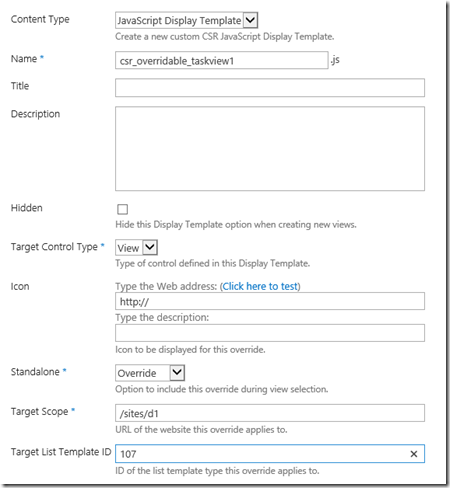
3-Javascript Display Template en Sharepoint 2013

image

Esta feature nos permitirá asociar javascript de forma fácil a View/Form/Field de una lista.

http://www.learningsharepoint.com/2013/03/31/uploading-javascript-js-files-as-javascript-display-template-in-sharepoint-2013/

http://www.idubbs.com/blog/2012/js-link-for-sharepoint-2013-web-partsa-quick-functional-primer/

http://www.learningsharepoint.com/2012/09/17/sharepoint-2013-the-new-display-templates-for-styling-your-content/

4-SAP NetWeaver Gateway OData Service en SharePoint 2013 App

image

SAP NetWeaver Gateway and OData for SAP Applications

Este paper nos explicará como consumir un servicio REST (oData) desde SAP NetWeaver Gateway

http://www.sdn.sap.com/irj/scn/go/portal/prtroot/docs/library/uuid/b02b567b-0f7c-3010-e598-f4a90c82beb3?QuickLink=index&overridelayout=true&58261231397952

http://blogs.msdn.com/b/officeapps/archive/2013/03/15/duet-workflow-extensibility-and-sharepoint-hosted-apps-part-1.aspx

5-Sharepoint 2013 Client Components SDK

Este paquete permite desarrollar localmente o remotamente para Sharepoint 2013

http://www.microsoft.com/en-us/download/details.aspx?id=35585

domingo, 24 de marzo de 2013

Links útiles #29 Sharepoint 2013

1-Promoted Actions Sharepoint 2013 mediante Visual Studio 2012

El siguiente link nos indica como agregar links en la sección de Promoted Actions de Sharepoint 2013

"Promoted Actions Links SharePoint 2013"

http://www.learningsharepoint.com/2013/02/19/add-links-to-promoted-actions-sharefollowsync-in-sharepoint-2013/

2-Aplicar theme a un sitio mediante Visual Studio 2012

El link a continuación nos permitirá crear una composed look de una previamente definida en Sharepoint 2013, cambiará los colores, la font y el background de la misma. En resumen, nos permitirá aplicar themes de manera rápida mediante la activación de una feature.

http://yuriburger.net/2013/03/24/deploying-and-activating-sharepoint-2013-themes-using-visual-studio/

3-Desarrollo de App para Sharepoint 2013

El siguiente artículo nos llevará por la creación de una app con Visual Studio 2012, el debugging de la misma y los posibles problemas de deployar la misma solución varias veces.

App part

http://www.sharepoint-journey.com/client-webpart-in-sharepoint-2013.html

4-Creación de custom actions en Sharepoint 2013 (Ribbon, Menu Item)

Testing Custom action for Ribbon 

Testing Create Custom action for Menu Item

http://www.sharepoint-journey.com/custom-actions-in-sharepoint-2013.html

5-App de Newfeeds para dispositivos móviles para Sharepoint 2013

http://blogs.office.com/b/sharepoint/archive/2013/03/06/out-and-about-new-sharepoint-mobile-offerings.aspx

viernes, 14 de diciembre de 2012

Links útiles #13 Sharepoint 2013

1-Diseñador de workflows para Sharepoint 2013

http://blogs.technet.com/b/office_sp/archive/2012/12/11/introducci-243-n-al-nuevo-dise-241-ador-visual.aspx

http://blogs.technet.com/b/office_sp/archive/2012/12/11/c-243-mo-utilizar-el-dise-241-ador-visual-de-sharepoint-designer-2013-para-mover-los-flujos-de-trabajo-entre-sitios.aspx

2-Rastreos continuos (continuos crawl) en Sharepoint 2010

http://blogs.msdn.com/b/sharepoint_sp/archive/2012/12/11/191-c-243-mo-puedo-alcanzar-la-mejor-actualizaci-243-n-de-resultados-de-la-b-250-squeda-introduciendo-rastreos-continuos-de-sharepoint.aspx

3-Quick Step con Sharepoint 2013 y Designer 2013

http://blogs.technet.com/b/office_sp/archive/2012/12/11/c-243-mo-crear-un-paso-r-225-pido-y-una-acci-243-n-personalizada-para-iniciar-el-flujo-de-trabajo-de-sharepoint-2013.aspx

4-Llamar a un servicio REST desde Sharepoint Designer 2013

http://blogs.technet.com/b/office_sp/archive/2012/10/11/c-243-mo-trabajar-con-un-servicio-web-mediante-la-acci-243-n-llamar-al-servicio-web-http.aspx

5-Routing and Throttling de request en Sharepoint 2013

http://blogs.technet.com/b/speschka/archive/2012/09/14/working-with-request-manager-in-sharepoint-2013.aspx

6-SSL Sharepoint 2013

http://walisystemsinc.com/sharepoint/art/ssl_selfsigned_cert/Setup%20SSL%20in%20SharePoint%202013%20using%20Self-Signed%20Certificate.pdf

jueves, 16 de agosto de 2012

Links útiles #47 Sharepoint 2010

1-Microsoft® SQL Server® 2008 R2 Reporting Services Add-in for Microsoft SharePoint® Technologies 2010

http://www.microsoft.com/en-us/download/details.aspx?id=622

2-Limitaciones de sandboxed solutions

http://salaudeen.blogspot.ca/2012/03/50-limitations-of-sharepoint-sandboxed.html?m=1

3-Crear custom field en Sharepoint 2010

http://christopherclementen.wordpress.com/2012/07/23/create-custom-field-type-with-user-control/

4-Tips de Búsqueda en Sharepoint 2010

http://cloud2.snappages.com/b8898dc2c08e137d03449de65b9e82e108c15658/Essential_SharePoint_Search_Hints_for_SharePoint_2010_and_Beyond.pdf

5-Custom action de Word Automation para convertir documentos en Sharepoint Designer

http://blog.petergerritsen.nl/2010/01/13/codeplex-project-for-word-automation-services/

6-Llamar web services desde infopath

http://wmostafaw.wordpress.com/2012/08/07/calling-web-service-from-infopath-2010-with-parameters/

7-Consumir un WCF services desde una sandboxed solutions

http://msmvps.com/blogs/sundar_narasiman/archive/2012/08/12/consuming-a-wcf-service-from-sharepoint-2010-sandbox-solutions.aspx

8-Agregar un forest de Active Directory al people picker de Sharepoint 2010

http://qazimobeen.wordpress.com/2012/08/06/sharepoint-people-picker-configuration-for-multiple-ad-forests/

9-Ver historial de Timer Jobs mediante PowerShell

http://www.glynblogs.com/2011/12/viewing-timer-job-history-for-a-specific-date-and-time-period.html

10- Highlight de una propieda custom en los resultados de búsqueda

http://edanan.wordpress.com/2012/08/09/highlight-custom-property-in-sharepoint-search-result/

sábado, 16 de junio de 2012

Tips/info #33 Sharepoint 2010

1-Error: soap:Server was unable to process request. —> Value does not fall within the expected range

Para resolver este error debes configurar “alternate access mappings” y asegurarte que la url este listada como url pública.

2-Error: InfoPath Forms Services forms cannot be filled out in a Web browser because no State Service connection is configured

Hay que crear el State Service Application y asociarlo con el web application deseado

  • Crear un nuevo state service application:
  • New-SPStateServiceApplication -Name “Shared State Service Application”
  • Crear una nueva base de datos para el state service application:
  • New-SPStateServiceDatabase -Name “Sharepoint_Shared_StateService” -ServiceApplication “Shared State Service Application”
  • Crear un nuevo proxy para el state service application y agregarlo en el default application proxy group:
  • New-SPStateServiceApplicationProxy -Name “Shared State Service Application” -ServiceApplication “Shared State Service Application” –DefaultProxyGroup
  • 2-Descargar los wsp del Central Administration

    $farm = Get-SPFarm
    $file = $farm.Solutions.Item("solution.wsp").SolutionFile
    $file.SaveAs("c:\Temp\solution.wsp")

    3-Página en blanco al tratar de ingresar al Central Administration

    Ingresar al administrador del IIS, y seleccionar el web application del central administration, y seleccionar a continuación Authentication.

    Revisar que la autentificación clasic esté habilitada.

    4-Nuevos tipos MIME han sido agregados para modo stricto en el CU de abril 2012

    application/vnd.ms-excel.addin.macroEnabled.12 application/vnd.ms-excel.sheet.binary.macroEnabled.12 application/vnd.ms-excel.sheet.macroEnabled.12
    application/vnd.ms-powerpoint.addin.macroEnabled.12
    application/vnd.ms-powerpoint.slideshow.macroEnabled.12
    application/vnd.openxmlformats-officedocument.presentationml.presentation application/vnd.openxmlformats-officedocument.presentationml.slideshow application/vnd.openxmlformats-officedocument.presentationml.template application/vnd.openxmlformats-officedocument.spreadsheetml.sheet application/vnd.openxmlformats-officedocument.spreadsheetml.template application/vnd.openxmlformats-officedocument.wordprocessingml.document application/vnd.openxmlformats-officedocument.wordprocessingml.template

    5-Error: Microsoft.SharePoint.SPException: This view requires at least Microsoft Internet Explorer 7.0, Mozilla FireFox 3.0, or Apple Safari 3.0.    at Microsoft.SharePoint.WebControls.Gantt.OnLoad(EventArgs e) 

  • Abrir RegEdit en el server de search
  • Ir a  HKLM\SOFTWARE\Microsoft\Office Server\14.0\Search\Global\Gathering Manager
  • Cambiar la key UserAgent
  • Mozilla/4.0 (compatible; MSIE 4.01; Windows NT; MS Search 6.0 Robot)

    a esto

    Mozilla/4.0 (compatible; MSIE 7.0; Windows NT; MS Search 6.0 Robot)

  • Restar los searchs de crawl.
  • 6-Error al ingresar al Central Administration: Service Unavailable  HTTP Error 503

    Verifica que la cuenta que corre el servicio del central administration tenga la opción “Log on as a batch job” habilitada.

    7-Diferencia entre las opciones de crear columnas de sitio y de listas/librerias.

    imageimage

    Más info: http://office.microsoft.com/en-us/sharepoint-server-help/site-column-types-and-options-HA010302196.aspx#_Toc277149832

    8-Agregar un custom action, en la sección “Acciones del sitio” (Site Actions)

    En el archivo Element.xml (la feature agregada previamente)

    <?xml version="1.0" encoding="utf-8"?>
    <Elements xmlns="http://schemas.microsoft.com/sharepoint/">
      <CustomAction Id="MySearchAction"
                    GroupId="SiteActions"
                    Location="Microsoft.SharePoint.StandardMenu"
                    Sequence="1000"
                    Title="Google search">
        <UrlAction Url="http://www.google.com/"/>
      </CustomAction>
    </Elements>

    9-Algunos ejemplos de REST sobre Sharepoint 2010

    Listar todos los objetos del site
    http:/<sp>/_vti_bin/ListData.svc

    Listar todos los items de una lista
    http://<sp>/_vti_bin/ListData.svc/Nombre_de_Lista

    Listar un item específico de una lista
    http://<sp>/_vti_bin/ListData.svc/Nombre_de_Lista(<ID>)

    Listar un campo de un item específico de una lista
    http://<sp>/_vti_bin/ListData.svc/ListName(<ID>)/(<Nombre_campo_interno>)

    Filtrar listas dependiendo de un filtro
    http://<sp>/_vti_bin/ListData.svc/ListName?$filter=<Nombre_campo_interno> <operator> <valor>

    10-Error en una aplicación Silverlight “an unhandled exception” al tratar de usar client object

    Esto ocurre porque silverlight no puede conectarse al endpoint de WCF para usar Client Object Model, esto se debe a que la opción Security validation está en Off.

    • Abir el Central Administration
    • Seleccionar Application Management
    • Seleccionar  Manage Web Applications
    • Seleccionar el Web Application donde el error ocurre
    • En la ribbon, seleccionar General Settings
    • En la sección Web Application General Settings, encontrar Web Page Security Validation y seleccionar On

    miércoles, 6 de junio de 2012

    Tips/info #28 Sharepoint 2010

    1-Error: Sharepoint Service Error: A deployment or retraction is already under way for the solution “xxx.wsp” , and only one deployment or retraction at a time is supported

    Para solucionar haga lo siguiente:

  • Abra una consola de powershell y vaya a la ubicación siguiente: C:\Program Files\Common Files\Microsoft Shared\web server extensions\14\BIN y escriba stsadm -o enumdeployments
  • Verificamos el id del job que está generando conflicto
  • Y ejecutamos lo siguiente: stsadm -o canceldeployment -id ” jobId”

    2-Error:“Error Updates are currently disallowed on GET requests.  To allow updates on a GET, set the ‘AllowUnsafeUpdates’ property on SPWeb. Troubleshoot issues with Microsoft SharePoint Foundation”

    $w = get-spwebapplication http://nombredelwebapplication
    $w.HttpThrottleSettings
    $w.Update
    ()
    3-Los botones de página de layouts y de texto de layouts está grisados o deshabilitados
    Ir a la master page del sitio y agregar en el body, lo siguiente:
    <body onload=”javascript:_spBodyOnLoadWrapper();”>
    4-Habilitar el modo debug de los archivos js de Sharepoint 2010
    Como saben, Sharepoint tiene dos versiones de cada archivo core de javascript de Sharepoint. Ej: sp.js, y el sp.debug.js
    Esos archivos pueden encontrarse en C:\Program Files\Common Files\Microsoft Shared\Web Server Extensions\14\TEMPLATE\_LAYOUTS
    Si se desea cargar los archivos debug para un web application, se debe ir a C:\inetpub\wwwroot\wss\VirtualDirectories y abrir la carpeta con el puerto deseado.
    Localizar web.config y editar de la siguiente manera:
    <compilation batch="false" debug="false">
    reemplazarlo con 
    <compilation batch="false" debug="true">
    y hacer un iisreset.
    5-Obtener las content database por web application con powershell
    Get-SPWebApplication | %{Write-Output "`n- $($_.url)"; foreach($cd in $_.contentdatabases){Write-Output $cd.name}} >> C:\Temp\contentdatabases.txt
    6-ListItem.Update Powershell Exception (Cannot take 0 arguments)


    Posiblemente la excepción sea por problemas de permisos del usuario que ejecuta el script.


    7-No aparece la opción “Manage content and structure”


    Habilitar las features 'SharePoint Server Publishing Infrastructure' a nivel de Site Collection, y después activar la feature 'SharePoint Server Publishing'


    8-Agregando un adjunto con SPList a un item


  • private void AgregarAdjunto(int ID_item)
    {
        try
        {
            SPList lista = SPContext.Current.Web.Lists["nombre Lista"];


            SPListItem miItem = lista.GetItemById(ID_item);


            if (fileUpload.PostedFile != null && fileUpload.HasFile)
            {


                Stream fStream = fileUpload.PostedFile.InputStream;


                byte[] contents = new byte[fStream.Length];


                fStream.Read(contents, 0, (int)fStream.Length);


                fStream.Close();


                fStream.Dispose();


                SPAttachmentCollection attachments = miItem.Attachments;


                string fileName = Path.GetFileName(fileUpload.PostedFile.FileName);


                attachments.Add(fileName, contents);


                miItem.Update();


            }


        }
        catch (Exception ex)
        {    }
    }


    9-Cargar un archivo css mediante el control CssRegistration


    <SharePoint:CssRegistration ID="CssRegistration1" Name="/Style Library/estilo.css"
        runat="server" After="corev4.css" />

    10-Acciones de comando en los custom actions

    {ItemId} – ID (GUID) taken from the list view.
    {ItemUrl} – Web-relative URL of the list item (Url).
    {RecurrenceId} – ID of a recurrent item (RecurrenceID).
    {SiteUrl} – The fully qualified URL to the site (Url).
    {ListId} – ID (GUID) of the list (ID).
    {ListUrlDir} – Server-relative URL of the site plus the list's folder.
    {Source} – Fully qualified request URL.
    {SelectedListId} – ID (GUID) of the list that is currently selected from a list view.
    {SelectedItemId} – ID of the item that is currently selected from the list view.
    ~site    SPContext.Current.Web.ServerRelativeUrl
    ~sitecollection    SPContext.Current.Site.ServerRelativeUrl


    http://msdn.microsoft.com/en-us/library/ff458385.aspx

    sábado, 2 de junio de 2012

    Tips/info #26 Sharepoint 2010

    1-Obtener la cantidad de items de una web application mediante powershell
    if ( (Get-PSSnapin -Name Microsoft.SharePoint.PowerShell -ErrorAction SilentlyContinue) -eq $null ) 
    {Add-PSSnapin Microsoft.SharePoint.Powershell}
    
    $SPWebApp = Get-SPWebApplication("http://intranet.contoso.com")
    
    $cantidad=0
    foreach ($SPSite in $SPWebApp.Sites)
    {
        Write-Host "Inicio de lectura de Site Collection: " $SPWeb.Title
        foreach ($SPWeb in $SPSite.AllWebs)
        {
            Write-Host "Inicio de lectura para sitio: " $SPWeb.Title
            foreach ($SPList in $SPWeb.Lists)
            {
                Write-Host "Inicio lectura de lista:" $SPList.Title " la misma tiene " $SPList.ItemCount 
                foreach ($SPListItem in $SPList.Items)
                {
                    $cantidad=$cantidad+1                
                }            
            }
            $SPWeb.dispose() 
        }
        $SPSite.dispose()
    }
    Write-Host "Cantidad de Items: " $cantidad
    
    2-Error al ingresar a  /_admin/ServiceJobDefinitions.aspx
    "Object Reference not set to an instance of an object" error.

    System.NullReferenceException: Object reference not set to an instance of an object.
    Microsoft.Office.Project.Server.Administration.ServerScheduledTimerJob.get_DisplayName()Microsoft.SharePoint.ApplicationPages.JobDefinitionsDataSourceView.AddRow(SPJobDefinition jd, DataTable table, DataSourceSelectArguments selectArguments)


    Podremos ver en el event viewer algunos errores relacionados a esta excepción, los cuales informan el ID del job.

    Ej: There was an exception loading job definition "Microsoft.Office.Project.Server.Administration.ServerScheduledTimerJob" (id "27ff4638-a131-4100-9796-2c72f29ec0a8"). Object reference not set to an instance of an object.

    Para borrarlo, se deberá ejecutar el siguiente comando

    $job = Get-SPTimerJob  27ff4638-a131-4100-9796-2c72f29ec0a8
    $job.delete()

    Hay casos que borrando todos los ID de los jobs que aparecieron en el Event Viewer, siga habiendo problemas al ingresar a ServiceJobsDefinitios.

    Para ello ejecutamos lo siguiente:

    $jobNulls = Get-SPTimerJob | Where-Object {$_.DisplayName -eq $null}

    $jobNulls

    Nos retornará algo así:

    Name                 Schedule             Last Run
    ----                 --------             --------
    PWASSP_7a8e8c16-3... daily between 01:... 1/1/0001 12:00:00 AM
    PWASSP_7a8e8c16-3... hourly between 0 ... 1/1/0001 12:00:00 AM
    PWASSP_7a8e8c16-3... daily between 00:... 1/1/0001 12:00:00 AM
    PWASSP_84eec303-4... daily between 00:... 1/1/0001 12:00:00 AM
    PWASSP_ce05f8e3-3... daily between 00:... 1/1/0001 12:00:00 AM
    PWASSP_f8d30a49-6... daily between 00:... 1/1/0001 12:00:00 AM

    De esta manera ejecutando lo siguiente:

    get-sptimerjob | where-object {$_.name -like "*PWASSP_84eec303-4*"} | format-list name, id

    Nos retornará el ID correspondiente, y podremos borra el job mediante el comando especificado más arriba.

    3-Iniciar un job mediante powershell

    get-sptimerjob | where-object {$_.name -like "EPM*"} | Start-SPTimerJob

    Si se desea ejecutar un job de un determinado web application

    $wa = Get-SPWebApplication $url

    Get-SPTimerJob | ?{$_.Name -match "EPM"} | ?{$_.Parent -eq $wa} | Start-SPTimerJob

    4-Error: There are no addresses available for this application

    Este error surge cuando se un servicio de Sharepoint está apagado.

    Ir a "Manage services on server" ver si los servicios necesario están corriendo. Si el error sige surgiendo mientras el servicio está corriendo, hace un iisreset.

    5-Error al deployar una solución: Error occurred in deployment step ‘Add Solution’: The EXECUTE permission was denied on the object ‘proc_putObject’, database ‘SharePoint_Config’, schema ‘dbo’.

    Hay que agregar el rol “SharePoint_Shell_Access” para el usuario sobre la base Sharepoint_Config

    image_thumb2

    6-Features en Sharepoint 2010

    SharePoint Features pueden estar al alcance de la Farm, Web Application, Site Collection, y Web Site dependiendo de la característica. El “Feature scope” es determinado seteando el atributo “Scope” en el elemento feature en el archivo feature.xml

    Ej:

    <Feature Id="G73C15DF-59ED-33be-8732-E6FFBW1439184" 
    Title="titulo de la Feature" 
    Description="Descripcion de la Feature" 
    Version="1.0.0.0" 
    Scope="Site"
    Hidden="false"> 
    </Feature>
    Tipos de elementos para features


    Elemento

    Descripción

    Scope

    Content Type

    Contiene un esquema de definición que puede reusarse y aplicarse a multiples definiciones de listas.

    Site

    Content Type Binding

    Content type binding habilita la provisión de un content type sobre una lista definida en el esquema Onet.xml. Listas definidas en el esquema Onet.xml no pueden ser modificadas de forma directa.

    Site

    Control

    Un control delegado contiene una registración para un control bien conocido instalado en la página. Este permite reemplazar controles existentes tales como Windows SharePoint Services search control, con otro control.

    Farm, WebApplication, Site, Web

    Custom Action

    Puede definir los siguientes tipos de acciones personalizadas:

    ·         Links para la página de configuración de Content type

    ·         Menú de acciones para el menú Drop-down que aparece para un item.

    ·        Botones de formularios para forms de  New, Edit, o Display

    ·         Link para la página Site Settings.

    Farm, WebApplication, Site, Web

    Custom Action Group

    Define un grupo de custom actions

    Farm, WebApplication, Site, Web

    Document Converter

    Contiene la definición de un convertidor de documentos.Un convertidor de documentos es un archivo ejecutable personalizado que toma un documento de un tipo de archivo, y genera una copia de ese archivo en otro tipo de archivo.

    WebApplication

    Feature/Site Template Association

    Enlaza una característica (feature) a una configuración de definición de sitio para que los sitios creados se doten de la característica.

    Farm, WebApplication, Site

    Field

    Contiene una definición de campo que se puede reutilizar entre varias listas.

    Site

    Hide Custom Action

    Oculta una acción personalizada (custom action) que se ha añadido a través de otra acción personalizada.

    Farm, WebApplication, Site, Web

    List Instance

    Provisiona un sitio de SharePoint con una lista específica de datos.

    Site, Web

    List Template

    Provisiona una definición de lista o de la plantilla, que define una lista que puede ser suministrada en un sitio de SharePoint.

    Site, Web

    Module

    Contiene un conjunto de archivos con los cuales provisionan sitios.

    Site, Web

    Receiver

    Contiene el registro de un manejador de eventos

    Web

    Workflow

    Contiene la definición para un workflow en una lista.

    Site

    sábado, 26 de mayo de 2012

    Links útiles #24 Sharepoint 2010

    1-Obtener el número total de versiones de todos los items en una site collection

    http://jshidell.com/2012/05/21/get-the-total-number-of-versions-for-all-items-in-a-site-collection-using-powershell/

    2-Crear un custom action mediante Visual Studio

    http://www.sharemuch.com/2011/11/12/adding-custom-actions-in-your-sharepoint-2010-list-item-context-menus/

    http://weblogs.asp.net/jan/archive/2007/09/05/using-the-current-page-url-in-the-urlaction-of-a-sharepoint-feature.aspx

    http://www.thorntontechnical.com/tech/sharepoint/sharepoint-2010-context-menu-item-with-custom-code

    3-Iniciar todos los jobs habilitados

    http://get-spscripts.com/2012/05/start-all-enabled-timer-jobs-on.html

    4-Licencias de OFFICE WEB APPS (OWA)

    http://levinwayne.wordpress.com/2012/05/15/office-web-app-licensing-quick-guide/

    5-Saber a qué instancia de w3wp atachar cuando debugeamos con Visual Studio

    http://ybbest.wordpress.com/2012/03/22/how-to-find-which-w3wp-exe-to-attach-when-debugging-your-sharepiont2010-project/

    6-Convertir a pdf archivos word mediante word services

    http://msdn.microsoft.com/en-us/library/ff181518.aspx

    7-Disparar un event handler si la ribbon cambia

    http://spmonkeypoint.wordpress.com/2012/05/16/trigger-an-event-whenever-the-sharepoint-2010-ribbon-changes/

    8-Eliminar un site collection huérfano

    http://0ut0ftheb0x.wordpress.com/2012/05/17/orphanedsitecollectio/

    9-Administración de content databases con powershell

    http://www.mssqltips.com/sqlservertip/2608/managing-sharepoint-content-databases-with-powershell/

    10-Remover el host de mysite con client object y powershell

    http://www.c-sharpcorner.com/UploadFile/anavijai/remove-my-site-host-location-url-in-sharepoint-2010/

    11-Conectar web parts con Visual Studio 2010

    http://www.fewlines4biju.com/2011/09/connected-web-part-in-sharepoint-2010.html

    12-Multiple dropdown con Infopath 2010

    https://www.nothingbutsharepoint.com/sites/eusp/Pages/SharePoint-How-to-Create-Multiple-Cascade-drop-downs-using-InfoPath-2010.aspx

    13-Implementar una wiki empresarial

    http://www.denisstadler.com/sharepoint-2010/ecm-collaboration/step-by-step-how-to-implement-an-enterprise-wiki/

    14-Crear una opción para el panel de refinamiento

    http://purunep.wordpress.com/2012/05/25/building-custom-search-refiners-in-sharepoint-2010-server/

    15-Custom ADFS Login (forms)

    http://blog.helloitsliam.com/Lists/Posts/Post.aspx?List=e10cb685-6b5c-4b6c-aaf4-e1d122d57174&ID=76&Web=8fe3252e-9495-44f1-b2e4-dbd7b201440b

    16-Warm-up para autentificación via formularios

    http://peterheibrink.wordpress.com/2012/05/06/warm-up-script-for-form-based-authentication-fba-sharepoint-sites/

    sábado, 31 de marzo de 2012

    Links útiles #13–Sharepoint 2010

    1-Implementar un web part consumidor

    http://www.matchpointcommunity.com/blog/Posts/45/how-to-implement-a-consumer--producer-webpart

    2-Soportar IE6 en MySite

    http://blog.libinuko.com/2012/03/25/sharepoint-2010-how-to-support-ie6-0-to-access-mysite/

    3-Upgrade o migración desde MOSS 2007 a SPS 2010

    Hay dos maneras de hacer el upgrade:

    • Inplace upgrade
    • database attach y upgrade

    http://blogs.msdn.com/b/sharepoint__cloud/archive/2012/03/25/important-points-on-upgrade-to-sharepoint-2010.aspx

    4-Crear un web part con tips diarios

    http://sharepointhero.wordpress.com/2012/03/10/adding-a-simple-tip-of-the-day-web-part-22-2/

    5-Configurar FBA (autentificación basada en forms) con Sharepoint 2010

    http://blogs.technet.com/b/pfelatam/archive/2012/03/21/como-configurar-fba-forms-based-authentication-en-sharepoint-server-2010-utilizando-iis-7-y-asp-net-membership-database-sql-como-en-moss-2007.aspx

    6-Configurar Kerberos con Sharepoint 2010

    http://www.microsoft.com/download/en/details.aspx?id=23176

    https://www.nothingbutsharepoint.com/sites/itpro/Pages/How-To-Configure-Kerberos-Authentication-for-SharePoint-2010.aspx

    http://www.thesharepointblog.net/Lists/Posts/Post.aspx?List=815f255a-d0ef-4258-be2a-28487dc9975c&ID=43

    http://blogs.msdn.com/b/echarran/archive/2010/02/11/howto-configure-sharepoint-2010-for-kerberos.aspx

    http://blogs.msdn.com/b/russmax/archive/2009/10/20/configuring-kerberos-authentication-in-sharepoint-2010-part-1.aspx

    7-Alertas custom en Sharepoint 2010

    http://www.codeproject.com/Articles/351400/SharePoint-2010-Custom-Alert-Me-for-Discussion-Boa

    8- Restore de una base de contenidos de un backup de Sharepoint

    http://blog.bugrapostaci.com/2012/03/26/sharepoint-2010-manuel-content-database-restore-from-sharepoint-backup-folder/

    9-Logging de eventos en Sharepoint 2010 (timer jobs, item event receivers, desde código custom)

    http://www.thesharepointblog.net/Lists/Posts/Post.aspx?List=815f255a-d0ef-4258-be2a-28487dc9975c&ID=106

    10- Lista para vacaciones y time card

    http://www.sharepoint911.com/blogs/laura/Lists/Posts/Post.aspx?ID=105

    11-Agregar link o info en el header de Sharepoint 2010 (mediante javascript/css, controles delegados, custom action)

    https://www.nothingbutsharepoint.com/sites/devwiki/articles/Pages/Global-Link-in-SharePoint-Sites-Using-Configuration-Files.aspx

    12-Filtrar datos con html form web part

    http://office.microsoft.com/en-us/sharepoint-server-help/use-the-html-form-web-part-to-filter-and-display-data-in-another-web-part-HA101791813.aspx

    http://www.learningsharepoint.com/2011/08/07/using-html-form-web-part-to-filterwith-examples-sharepoint-2010/

    13-Ocultar templates de site en Sharepoint 2010

    http://hermansberghem.blogspot.com.ar/2011/03/hiding-site-templates.html?utm_source=BP_recent