Mostrando entradas con la etiqueta Central Administration. Mostrar todas las entradas

lunes, 25 de febrero de 2013

Links útiles #59–Sharepoint 2010

1-Services App Starter Kit para Visual Studio 2010 y Sharepoint 2010 (crear Sharepoint custom services)

http://visualstudiogallery.msdn.microsoft.com/a8539635-2d9a-468e-bddf-341332061ec7

2-Metadata sobre una carpeta de Sharepoint

http://geeks.ms/blogs/santypr/archive/2012/10/16/sharepoint-2010-a-241-adir-metadatos-a-las-carpetas-de-una-biblioteca-de-documentos.aspx

3-Remover usuarios huérfanos (no están más en el Active Directory) de Sharepoint 2010

http://weblogs.asp.net/bsimser/archive/2013/02/12/powershell-tools-removing-orphaned-users-from-sharepoint.aspx

4-MySite en detalles

http://blogbaris.blogspot.com.ar/2011/03/sharepoint-2010-mysite-in-detail.html

http://blogbaris.blogspot.com.ar/2010/09/how-to-setup-mysite-in-sharepoint-2010.html

5-Load Balanced Central Administration Sharepoint 2010

http://walkthroughsharepoint2010.blogspot.com.ar/2013/02/central-admin-load-balance-procedure.html

6-Snapshots en Sharepoint 2010

http://blogs.msdn.com/b/mossbiz/archive/2013/01/14/sharepoint-vs-snapshots.aspx

http://blogs.msdn.com/b/mossbiz/archive/2013/02/22/sharepoint-vs-snapshots-part-2.aspx

7-SPServices y CRUD operaciones

http://meandmysharepoint.blogspot.com.ar/2013/02/crud-operations-using-spservices.html

8-Best practices de VMware para Sharepoint 2010

http://www.vmware.com/solutions/business-critical-apps/sharepoint-virtualization/index.html

http://www.vmware.com/files/pdf/solutions/SharePoint_2010-Best-Practices-Guide.pdf

9-Deploy web part en Sharepoint 2010

http://amalhashim.wordpress.com/2013/02/14/sharepoint-deploy-webpart-page-using-module/

10-People Picker en Silverlight

http://blogs.technet.com/b/speschka/archive/2011/08/09/writing-a-sharepoint-2010-people-picker-control-for-silverlight.aspx

lunes, 18 de febrero de 2013

Links útiles #20 Sharepoint 2013

1-Caracteristicas y capacidades de Sharepoint 2013 para sitios de internet (features and capabilities )

http://blogs.technet.com/b/mspfe/archive/2013/01/29/public-facing-internet-sites-based-on-sharepoint-server-2013.aspx

2-People Picker para Apps en Sharepoint 2013

http://msdn.microsoft.com/en-us/library/jj713593(v=office.15).aspx

3-Instalar Sharepoint 2013 sobre Azure

http://labratcentral.wordpress.com/2013/01/25/install-sharepoint-2013-on-azurevm-how-to/

4-Mover Search Index Sharepoint 2013

http://gallery.technet.microsoft.com/scriptcenter/Move-SharePoint-2013-242869e2

5-MVC y Apps en Sharepoint 2013

http://spblogedin.blogspot.com.ar/2013/02/las-apps-de-sharepoint-2013-iv-una-app.html#.URrARKWqllg

http://www.ilovesharepoint.com/2012/07/building-aspnet-mvc-based-sharepoint.html

6-SSL para Central Administration en Sharepoint 2013

http://www.harbar.net/archive/2013/02/13/Using-SSL-for-Central-Administration-with-SharePoint-2013.aspx

7-WAN y Sharepoint 2013

http://technet.microsoft.com/en-us/library/hh206322.aspx

8-Best Bet o Promoted results search en Sharepoint 2013

http://nishantrana.wordpress.com/2013/02/06/best-bet-or-promoted-results-in-sharepoint-2013/

9-Refinement Panel en Sharepoint 2013

http://nishantrana.wordpress.com/2013/02/06/adding-refiner-count-in-refinement-web-part-in-sharepoint-2013/

10-App para Sharepoint hosteada en Azure

http://blogs.msdn.com/b/steve_fox/archive/2013/02/18/building-your-first-provider-hosted-app-for-sharepoint-using-windows-azure-part-1.aspx

sábado, 6 de octubre de 2012

Links útiles #51–Sharepoint 2010

1-Mostrar el resultado de una búsqueda en formato xml

http://msdn.microsoft.com/en-us/library/ms546985.aspx

2-El Central administration tarda mucho tiempo en cargar después de un iisreset

http://blogs.msdn.com/b/tehnoonr/archive/2012/05/17/sharepoint-central-administration-web-site-takes-a-long-time-to-load-after-an-iis-reset.aspx

3-La guía definitiva para configurar Kerberos

http://blog.blksthl.com/2012/09/26/the-final-kerberos-guide-for-sharepoint-technicians/

4-Forms Authentication en Sharepont 2010 con IIS 7

http://donalconlon.wordpress.com/2010/02/23/configuring-forms-base-authentication-for-sharepoint-2010-using-iis7/

5-Crear un modelo BDC para Sharepoint 2010

http://estarktechnologies.wordpress.com/2012/09/24/13/

6-Qué soluciona el SP1 de Sharepoint ? Lista amigable para ver los problemas que soluciona

http://sharepointknowledgebase.blogspot.com.ar/2011/12/fixes-included-in-sharepoint-2010.html

7-Sharepoint List y Integration Services (SSIS)

http://www.mssqltips.com/sqlservertip/2763/using-ssis-to-automatically-populate-a-sharepoint-list/

8-Agregar la versión del item en el documento de word adjunto

http://codebycody.com/2011/07/07/add-the-sharepoint-version-number-to-a-word-document/

9-Creación de sites muy lenta

http://www.novolocus.com/2012/10/05/slow-site-creation-in-sharepoint-2010

10-Custom upload form

http://byteloom.blogspot.com.ar/2012/01/custom-upload-form-for-document-library.html

http://blogs.perficient.com/microsoft/2011/03/destination-folder-field-in-site-upgraded-from-moss-2007-to-sharepoint-server-2010/

martes, 28 de agosto de 2012

Links útiles #48 Sharepoint 2010

1-Debugging del search de Sharepoint 2010 con Fiddler

http://www.ableblue.com/blog/archive/2012/01/04/troubleshooting-sharepoint-search-crawl/

2-Página 404 custom en Sharepoint 2010

http://salaudeen.blogspot.nl/2012/06/custom-404-page-not-found-error-page-in.html

3-Tags & Notes sobre items de lista

http://blog.qumsieh.ca/2012/08/21/displaying-tags-notes-on-items-in-sharepoint-2010/

4-Mostrar grupos de Sharepoint en un formulario de infopath

http://nickhobbs.wordpress.com/2012/08/11/sharepoint-2010-display-sharepoint-groups-in-an-infopath-form-drop-down-list-box/

5-Documentum Vs Sharepoint

http://www.tcs.com/SiteCollectionDocuments/White%20Papers/EntSol_Whitepapers_Core-ECM-Features-Documentum-SharePoint_11_2011.pdf

6-Mostrar Grupos de Sharepoint en un combo de infopath

http://nickhobbs.wordpress.com/2012/08/11/sharepoint-2010-display-sharepoint-groups-in-an-infopath-form-drop-down-list-box/

7-Configurar ssl para el central administration

http://www.codeproject.com/Articles/75597/How-to-Configure-SSL-Certificate-for-the-Central-A

8-Business Connectivity Services – Conexión contra ORACLE CRUD

http://dotnetfinder.wordpress.com/2012/08/27/how-to-connect-to-the-oracle-database-using-business-connectivity-services-bcs-in-sharepoint-2010/

9-Editar el campo que aparece el dropdown de context menú de listas o librerías

http://www.youtube.com/watch?v=hpQtj3_8zao

10-Sincronización de perfiles

IC494978

http://technet.microsoft.com/en-us/library/gg188041.aspx

sábado, 16 de junio de 2012

Tips/info #33 Sharepoint 2010

1-Error: soap:Server was unable to process request. —> Value does not fall within the expected range

Para resolver este error debes configurar “alternate access mappings” y asegurarte que la url este listada como url pública.

2-Error: InfoPath Forms Services forms cannot be filled out in a Web browser because no State Service connection is configured

Hay que crear el State Service Application y asociarlo con el web application deseado

  • Crear un nuevo state service application:
  • New-SPStateServiceApplication -Name “Shared State Service Application”
  • Crear una nueva base de datos para el state service application:
  • New-SPStateServiceDatabase -Name “Sharepoint_Shared_StateService” -ServiceApplication “Shared State Service Application”
  • Crear un nuevo proxy para el state service application y agregarlo en el default application proxy group:
  • New-SPStateServiceApplicationProxy -Name “Shared State Service Application” -ServiceApplication “Shared State Service Application” –DefaultProxyGroup
  • 2-Descargar los wsp del Central Administration

    $farm = Get-SPFarm
    $file = $farm.Solutions.Item("solution.wsp").SolutionFile
    $file.SaveAs("c:\Temp\solution.wsp")

    3-Página en blanco al tratar de ingresar al Central Administration

    Ingresar al administrador del IIS, y seleccionar el web application del central administration, y seleccionar a continuación Authentication.

    Revisar que la autentificación clasic esté habilitada.

    4-Nuevos tipos MIME han sido agregados para modo stricto en el CU de abril 2012

    application/vnd.ms-excel.addin.macroEnabled.12 application/vnd.ms-excel.sheet.binary.macroEnabled.12 application/vnd.ms-excel.sheet.macroEnabled.12
    application/vnd.ms-powerpoint.addin.macroEnabled.12
    application/vnd.ms-powerpoint.slideshow.macroEnabled.12
    application/vnd.openxmlformats-officedocument.presentationml.presentation application/vnd.openxmlformats-officedocument.presentationml.slideshow application/vnd.openxmlformats-officedocument.presentationml.template application/vnd.openxmlformats-officedocument.spreadsheetml.sheet application/vnd.openxmlformats-officedocument.spreadsheetml.template application/vnd.openxmlformats-officedocument.wordprocessingml.document application/vnd.openxmlformats-officedocument.wordprocessingml.template

    5-Error: Microsoft.SharePoint.SPException: This view requires at least Microsoft Internet Explorer 7.0, Mozilla FireFox 3.0, or Apple Safari 3.0.    at Microsoft.SharePoint.WebControls.Gantt.OnLoad(EventArgs e) 

  • Abrir RegEdit en el server de search
  • Ir a  HKLM\SOFTWARE\Microsoft\Office Server\14.0\Search\Global\Gathering Manager
  • Cambiar la key UserAgent
  • Mozilla/4.0 (compatible; MSIE 4.01; Windows NT; MS Search 6.0 Robot)

    a esto

    Mozilla/4.0 (compatible; MSIE 7.0; Windows NT; MS Search 6.0 Robot)

  • Restar los searchs de crawl.
  • 6-Error al ingresar al Central Administration: Service Unavailable  HTTP Error 503

    Verifica que la cuenta que corre el servicio del central administration tenga la opción “Log on as a batch job” habilitada.

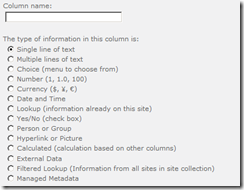
    7-Diferencia entre las opciones de crear columnas de sitio y de listas/librerias.

    imageimage

    Más info: http://office.microsoft.com/en-us/sharepoint-server-help/site-column-types-and-options-HA010302196.aspx#_Toc277149832

    8-Agregar un custom action, en la sección “Acciones del sitio” (Site Actions)

    En el archivo Element.xml (la feature agregada previamente)

    <?xml version="1.0" encoding="utf-8"?>
    <Elements xmlns="http://schemas.microsoft.com/sharepoint/">
      <CustomAction Id="MySearchAction"
                    GroupId="SiteActions"
                    Location="Microsoft.SharePoint.StandardMenu"
                    Sequence="1000"
                    Title="Google search">
        <UrlAction Url="http://www.google.com/"/>
      </CustomAction>
    </Elements>

    9-Algunos ejemplos de REST sobre Sharepoint 2010

    Listar todos los objetos del site
    http:/<sp>/_vti_bin/ListData.svc

    Listar todos los items de una lista
    http://<sp>/_vti_bin/ListData.svc/Nombre_de_Lista

    Listar un item específico de una lista
    http://<sp>/_vti_bin/ListData.svc/Nombre_de_Lista(<ID>)

    Listar un campo de un item específico de una lista
    http://<sp>/_vti_bin/ListData.svc/ListName(<ID>)/(<Nombre_campo_interno>)

    Filtrar listas dependiendo de un filtro
    http://<sp>/_vti_bin/ListData.svc/ListName?$filter=<Nombre_campo_interno> <operator> <valor>

    10-Error en una aplicación Silverlight “an unhandled exception” al tratar de usar client object

    Esto ocurre porque silverlight no puede conectarse al endpoint de WCF para usar Client Object Model, esto se debe a que la opción Security validation está en Off.

    • Abir el Central Administration
    • Seleccionar Application Management
    • Seleccionar  Manage Web Applications
    • Seleccionar el Web Application donde el error ocurre
    • En la ribbon, seleccionar General Settings
    • En la sección Web Application General Settings, encontrar Web Page Security Validation y seleccionar On

    viernes, 20 de abril de 2012

    Tips/Info #15–Sharepoint 2010

    1-Deshabilitar la vista mobil de Sharepoint 2010

    En tu web.config de tu web application agrega lo siguiente entre el nodo system.web

    <browserCaps>      <result type="System.Web.Mobile.MobileCapabilities, System.Web.Mobile, Version=2.0.0.0, Culture=neutral, PublicKeyToken=b03f5f7f11d50a3a"/>      <filter>isMobileDevice=false</filter>    </browserCaps>

    2-Ingresar a la lista TaxonomyHiddenList

    [site url]/Lists/TaxonomyHiddenList/AllItems.aspx

    TaxonomyHiddenListItem

    3-La opción de “Include Content” está deshabilitada al querer guardar una lista como template

    Esto se debe a que el contenido tiene más de 10 MB o que la propiedad “ExcludeFromTemplate” está en true

    4-Deshabilitar el resource throttling en una lista mediante powershell

       1:  $web = Get-SPWeb http://sitesharepoint/sites/demo
       2:  $largelist = $web.Lists["Lista larga"]
       3:  $largelist.EnableThrottling=$false
       4:  $largelist.Update()


    5-CEIP Data Collection timer job


    Este job se encarga del Customer Experience Improvement Program


    6-Provisionar el Central Administration en un diferente puerto


       1:  psconfig.exe -cmd adminvs -unprovision
       2:  psconfig.exe -cmd adminvs -provision -port 10000 -windowsauthprovider onlyusentlm
    7-Recuerde que puede atachar varios documentos a un item de lista, mediante la opción “Attach File” de la ribbon. Recuerde que debe habilitar la opción de “Enabled attachments” en las propiedades avanzadas de la lista
    8-Ocultar la quick launch con css


    <style type="text/css">
     
    #s4-leftpanel {
     DISPLAY: none
    }
    .s4-ca {
     MARGIN-LEFT: 0px
    }
     
    </style>
     
     Importante: si desea una solución más mantenible, utilice un master page con la sección del quick launch borrada o oculta.
    9-Vista “All People”

    http://site/_layouts/people.aspx?MembershipGroupId=0
    10-Activar Office Web Apps para todos los site collections

       1:  $webApps = $(Get-SPFeature -limit all | where {$_.displayname -eq “OfficeWebApps”}).Id

       2:  Get-SPWebApplication -identity “http://url_webapplication” | Get-SPSite -limit all | %{Enable-SPFeature $webApps -Url $_.URL}


    11-Logging en Sharepoint

    La base de datos de Logging almacena las siguientes cosas:


      • ULS Logs from 14 Hive\LOGS


      • Raw Resource Usage Data


    Esta data es usada por Web Analytics en Sharepoint. Dos jobs Microsoft SharePoint Foundation Usage Data Import y Microsoft SharePoint Foundation Usage Data Processing son usados para procesar la raw data a la base de datos de analytics.


    El siguiente comando de powershell permite ver los días de retención de información de la base de datos.


    Get-SPUsageDefinition


    El siguiente comando permite cambiar esta configuración:


    Set-SPUsageDefinition -Identity"Page Requests" -DaysRetained 3


    El ejemplo anterior cambia la configuración del procesamiento de Page Request.


    12-Qué puede restringirse para el search?


      • El sitio puede estar no disponible para el search: Site Actions – Site Settings – Search and Offline Availability

      • Los web parts permiten agregar seguridad lo cual restringen los resultados de búsqueda (Site Actions – Site Settings – Search and Offline Availability, seleccionar Do Not Index Web Parts if This Site Contains Fine-Grained Permissions)

      • Las listas o librerias permiten restringir su seguridad para que el crawled no la indexe (List / Library Settings – Advanced Settings / Sección Search)

      • Las columnas pueden restringirse para que no sean buscadas (Site Actions – Site Settings – Searchable Columns)

    13-Cambiar la URL de una colección de sitios


    Backup-SPSite -Identity http://sarepoint/sitios/url_vieja –Path “c:/backup.bak”
    Remove-SPSite -Identity http://sarepoint/sitios/url_vieja
    Restore-SPSite -Identity http://sarepoint/sitios/url_nueva –Path “c:/backup.bak” – force


    14-Setear un campo con el usuario actual mediante SPServices


       1:  <script type=”text/javascript”> $(document).ready(function() {
       2:   
       3:  $(‘id del field’).text($().SPServices.SPGetCurrentUser({fieldName: “Title”,debug: false}));
       4:   
       5:  </script>


    martes, 10 de enero de 2012

    PSConfig.exe – Central administration

    One of most important part of SharePoint setup is understanding the role of PSConfig.exe.

    It is located at %COMMONPROGRAMFILES%\Microsoft Shared\web server extensions\14\bin

    PSConfig.exe is an alternative interface to perform several operations that control how SharePoint 2010 Products are configured.

    This is useful when you want to make changes related to Central Admin site like:

    • Changing authentication
    • Re provisioning of central admin site from one server to another
    • You deleted site from IIS accidentally or screwed up in some other way

    as a simple solution open the command prompt and navigate to path above and give following command.

    > psconfig.exe -cmd adminvs -provision -port 42706 -WindowsAuthProvider OnlyUseNTLM

    And its done. you will see new central admin site with port 42706 with default ntlm authentication.

    You can find more details at : http://technet.microsoft.com/en-us/library/cc263093.aspx

    Alternate to use PSConfig is obvious PowerShell.

    “adminvs -provision” is now replaced with “New-SPCentralAdministration”  in PowerShell.

    So new command will be

    New-SPCentralAdministration -Port 42706 -WindowsAuthProvider “NTLM”


    More you can with con PSConfig:

    • Provision the Services (handy in case of unresolvable service application errors)
    • Provision the Central Administration (handy in case of unresolvable CA errors)
    • Resume a failed upgrade
    • Repair SharePoint 2010 installations

    Fuentes:

    http://www.thesharepointblog.net/

    http://angler.wordpress.com/

    Más información: