Mostrando entradas con la etiqueta Deployment. Mostrar todas las entradas

sábado, 12 de julio de 2014

Error al activar una feature

Al deployar una feature mediante un desarrollo de Visual Studio, me lanza el error

Error    1    Error occurred in deployment step 'Activate Features': Failed to load receiver assembly "SPDeployTheme, Version=1.0.0.0, Culture=neutral, PublicKeyToken=0cfdef6acbfeb744" for feature "SPDeployTheme_CustomTheme" (ID: 6c79f87c-dc70-4b98-9965-0c4b5a9365dd).: System.IO.FileNotFoundException: Could not load file or assembly 'SPDeployTheme, Version=1.0.0.0, Culture=neutral, PublicKeyToken=0cfdef6acbfeb744' or one of its dependencies. The system cannot find the file specified.
File name: 'SPDeployTheme, Version=1.0.0.0, Culture=neutral, PublicKeyToken=0cfdef6acbfeb744'
   at System.Reflection.RuntimeAssembly._nLoad(AssemblyName fileName, String codeBase, Evidence assemblySecurity, RuntimeAssembly locationHint, StackCrawlMark& stackMark, IntPtr pPrivHostBinder, Boolean throwOnFileNotFound, Boolean forIntrospection, Boolean suppressSecurityChecks)
   at System.Reflection.RuntimeAssembly.InternalLoadAssemblyName(AssemblyName assemblyRef, Evidence assemblySecurity, RuntimeAssembly reqAssembly, StackCrawlMark& stackMark, IntPtr pPrivHostBinder, Boolean throwOnFileNotFound, Boolean forIntrospection, Boolean suppressSecurityChecks)
   at System.Reflection.RuntimeAssembly.InternalLoad(String assemblyString, Evidence assemblySecurity, StackCrawlMark& stackMark, IntPtr pPrivHostBinder, Boolean forIntrospection)
   at System.Reflection.RuntimeAssembly.InternalLoad(String assemblyString, Evidence assemblySecurity, StackCrawlMark& stackMark, Boolean forIntrospection)
   at System.Reflection.Assembly.Load(String assemblyString)
   at Microsoft.SharePoint.Administration.SPFeatureDefinition.get_ReceiverObject()

WRN: Assembly binding logging is turned OFF.
To enable assembly bind failure logging, set the registry value [HKLM\Software\Microsoft\Fusion!EnableLog] (DWORD) to 1.
Note: There is some performance penalty associated with assembly bind failure logging.
To turn this feature off, remove the registry value [HKLM\Software\Microsoft\Fusion!EnableLog].

SOLUCION

Primero revise que no esté la solución deployada, en el caso que esté, la remuevo

image

Hago un iisreset y reinicio el Sharepoint Timer Service

Después agrego un nuevo key para “signar” el assembly

image

Trato de deployar de nuevo la solución, y anduvo perfecto.

image

lunes, 25 de febrero de 2013

Links útiles #59–Sharepoint 2010

1-Services App Starter Kit para Visual Studio 2010 y Sharepoint 2010 (crear Sharepoint custom services)

http://visualstudiogallery.msdn.microsoft.com/a8539635-2d9a-468e-bddf-341332061ec7

2-Metadata sobre una carpeta de Sharepoint

http://geeks.ms/blogs/santypr/archive/2012/10/16/sharepoint-2010-a-241-adir-metadatos-a-las-carpetas-de-una-biblioteca-de-documentos.aspx

3-Remover usuarios huérfanos (no están más en el Active Directory) de Sharepoint 2010

http://weblogs.asp.net/bsimser/archive/2013/02/12/powershell-tools-removing-orphaned-users-from-sharepoint.aspx

4-MySite en detalles

http://blogbaris.blogspot.com.ar/2011/03/sharepoint-2010-mysite-in-detail.html

http://blogbaris.blogspot.com.ar/2010/09/how-to-setup-mysite-in-sharepoint-2010.html

5-Load Balanced Central Administration Sharepoint 2010

http://walkthroughsharepoint2010.blogspot.com.ar/2013/02/central-admin-load-balance-procedure.html

6-Snapshots en Sharepoint 2010

http://blogs.msdn.com/b/mossbiz/archive/2013/01/14/sharepoint-vs-snapshots.aspx

http://blogs.msdn.com/b/mossbiz/archive/2013/02/22/sharepoint-vs-snapshots-part-2.aspx

7-SPServices y CRUD operaciones

http://meandmysharepoint.blogspot.com.ar/2013/02/crud-operations-using-spservices.html

8-Best practices de VMware para Sharepoint 2010

http://www.vmware.com/solutions/business-critical-apps/sharepoint-virtualization/index.html

http://www.vmware.com/files/pdf/solutions/SharePoint_2010-Best-Practices-Guide.pdf

9-Deploy web part en Sharepoint 2010

http://amalhashim.wordpress.com/2013/02/14/sharepoint-deploy-webpart-page-using-module/

10-People Picker en Silverlight

http://blogs.technet.com/b/speschka/archive/2011/08/09/writing-a-sharepoint-2010-people-picker-control-for-silverlight.aspx

domingo, 29 de julio de 2012

Tips/Info #54 Sharepoint 2010

1-Error: "Due to heavy load, the latest workflow operation has been queued"

Hay que incrementar el umbral de workflows

Set-SpFarmConfig -WorkflowPostponeThreshold 30

2-Excel en Sharepoint: “File is Corrupt”

Ir a File Options > Trust Center >  Protected View

Desmarcar las tres opciones.

Excel-Settings-to-fix-File-Is-Corrupted-error-300x138

3-Remover services application pools

Get-SPServiceApplicationPool
Remove-SPServiceApplicationPool  “El nombre del app pool”

4-Your client does not support opening this list with Windows Explorer

Les paso algunas recomendaciones que deberían verificar en su ambiente. En el caso que hagan alguna modificación, realicen un backup previo del server.

  • Verificar que un proxy o firewall NO esté interfiriendo con la conexión
  • Verificar que el servicio WebClient en la máquina cliente esté iniciado.
  • Usar un navegador Internet Explorer 7 o superior.
  • Verificar que el rol WebDav en el server esté instalado, en el caso que esté registrado, eliminalo y registralo de nuevo.
  • Verifica que el módulo de URL Scan en el IIS esté filtrando los comandos de WebDav
  • Agrega el site cómo sitio seguro en las configuraciones del IE (local intranet)
  • Agrega el site como network location, y guarda las credenciales
  • Instala los siguientes KB en el cliente: http://support.microsoft.com/kb/945015 , http://www.microsoft.com/en-us/download/details.aspx?id=15123
  • Edita la siguiente línea en el registro de windows (en el caso que no esté, agrega un DWORD value) : HKEY_LOCAL_MACHINE\SYSTEM\CurrentControlSet\Services\WebClient\Parameters y seteala a 2. Reinicia el WebClient services en services.msc.

5-Error al deployar una solución “Error occurred in deployment step ‘Retract Solution’: Attempted to perform an unauthorized operation.”

Ir al Central Administration->Application Management->Manage Web Applications

Selecionar el Web application donde se deploya la solution, y elegir User Policy, y dar permisos de full control al usuario que hace el deploy.

1665.image_thumb_6A82ED2A

sábado, 28 de julio de 2012

Links útiles #46 Sharepoint 2010

1-Comparación de herramientas de ULS log viewer

http://www.jeremytaylor.net/2012/07/14/sharepoint-uls-log-viewer-tool-comparison-and-verdict/

2-BDC y ORACLE

http://msdn.microsoft.com/en-us/library/ff464424.aspx

http://jmhogua.blogspot.com.ar/2010/10/conectando-oracle-con-sharepoint.html

http://www.c-sharpcorner.com/uploadfile/anavijai/integrating-oracle-into-sharepoint-2010-using-business-data-connectivity-model/

http://sharepointjournals.wordpress.com/2011/06/06/business-connectivity-services-bcs-with-oracle-using-visual-studio-2010-part-1/

http://www.c-sharpcorner.com/uploadfile/anavijai/how-to-connect-to-the-oracle-database-using-business-connectivity-services-bcs-in-sharepoint-2010/

3-Configurar la Búsqueda federada en Sharepoint 2010

http://blog.techgalaxy.net/archives/3599

http://technet.microsoft.com/en-us/sharepoint//ff727944.aspx

4-Incoming Email en Sharepoint 2010

http://jmhogua.blogspot.com.ar/2012/07/creando-entradas-de-blog-en-sharepoint.html

5-Deployar una solution sin tener perdida de servicio en Sharepoint 2010

http://blog.ithinksharepoint.com/2012/07/16/deploying-sharepoint-wsp-solutions-without-downtime/

6-Distintos tipos de carga de balanceo (load balancing)

https://devcentral.f5.com/weblogs/dmacvittie/archive/2009/03/31/intro-to-load-balancing-for-developers-ndash-the-algorithms.aspx

7-Sharepoint Oject Model: queries data

http://extreme-sharepoint.com/2012/07/17/data-access-via-caml-queries/

8-Crear un web part asincrónico Sharepoint 2010

http://sadomovalex.blogspot.com.ar/2012/07/create-asynchronous-web-parts-for.html

9-Migrar aplicaciones web de autentificación classic a claims

http://geeks.ms/blogs/marchena/archive/2012/07/20/migrando-aplicaciones-web-de-modo-cl-225-sico-de-autenticaci-243-n-a-modo-basados-en-claims.aspx

10-Infopath y Sandboxed solutions

http://msdn.microsoft.com/en-us/library/aa946986

http://msdn.microsoft.com/en-us/library/office/ee526360.aspx

http://www.slideshare.net/aymanelhattab/sharepoint-sandboxed-solutions-and-infopath-teched-middle-east

miércoles, 27 de junio de 2012

Tips/Info #39 Sharepoint

1-Error al tratar de acceder a la base de datos de search

Exception: System.Runtime.InteropServices.COMException (0xC0041236): Could not access the Search administration database. A generic error occurred while trying to access the database to obtain the schema version info.  

Ir a Start Menu -> SQL Server 2008 R2 -> Configuration Tools -> SQL Server Configuration Manager

verificar que la opción “Shared Memory” esté habilitada

SQLServerClient

Recuerde ejecutar SharePoint 2010 Products Configuration Wizard

También borre el siguiente registro:

“HKEY_LOCAL_MACHINE\SOFTWARE\Microsoft\Shared Tools\Web Server Extensions\14.0\WSS\Services\Microsoft.SharePoint.Search.Administration.SPSearchService”

2-Cargar funciones de javascript en el evento onload en Sharepoint

Sharepoint tiene el arreglo “_spBodyOnLoadFunctionNames”. Cuando el body es cargadp, el handler del evento onload ejecuta cada función que esté contenida en este arreglo. Ej:

<script language=”javascript”>
_spBodyOnLoadFunctionNames.push(“NombreFuncion”);
function NombreFuncion()
{
// Custom Javascript
}
</script>

3-Al restaurar una base de datos, Sharepoint nos dice que debemos hacer un upgrade

Get-SPContentDatabase |    ? { $_.NeedsUpgrade -eq $true } |    Upgrade-SPContentDatabase -Confirm:$false -Verbose:$true |    ft Name, Id, CanUpgrade, NeedsUpgrade
4-Ejecutar todos los jobs del Health Analyser

$jobs = Get-SPTimerJob | Where-Object {$_.Title -like "Health Analysis Job*"}
foreach ($job in $jobs)
{
  $job.RunNow()
}


5-Error “The application attempted to perform an operation not allowed by the policy.  To grant this application the required permission please contact your system administrator or change the application’s trust level in the configuration file.”


Anda al web.config del web application donde activas la feature C:\inetpub\wwwroot\wss\VirtualDirectories\[Web application directory]. Busca la siguiente línea:


<trust level="WSS_Minimal" originUrl="" />.


y reemaplaza WSS_Minimal con Full o WSS_Medium.

viernes, 15 de junio de 2012

Tips/info #31 Sharepoint 2010

1-Saber el lenguaje global y los packs de idiomas instalados mediante programación

SPLanguage globalLanguage = SPRegionalSettings.GlobalServerLanguage; //con esta sentencia se determina el idioma en el cual fue instalado Sharepoint

SPLanguageCollection languagePacks = SPRegionalSettings.GlobalInstalledLanguages; //Obtiene la colección de paquetes de idiomas que están instalados en el servidor.

Para más informacíón: http://msdn.microsoft.com/en-us/library/ms461103

2-SPWeb.AllProperties vs SPWeb.Properties

SPWeb.Properties es un diccionario de string (StringDictionary), y no soportar and doesn’t support casing for keys/values (everything gets converted to lowercase)

3-Incrementar el límite de tamaño al guardar una lista o site como template

stsadm -o setproperty -propertyname max-template-document-size -propertyvalue 50000000

4-Save as template: que se guarda y que no en el wsp


Lo siguiente se incluye en los templates (wsp):


Lists
Libraries
External Lists
Data source connections
List views and data views
Custom forms
Workflows
Content Types
Custom Actions
Navigation
Site pages
Master pages
Modules
WebTemplates


Lo siguiente NO se guarda en los templates (wsp)


Customized permissions
Running workflow instances
List item version history
Workflow tasks associated with running workflows
People/group field values
Taxonomy field values
Publishing pages and publishing sites
My Sites


5-Errores en el deploy de soluciones Sharepoint con Visual Studio 2010


Error occurred in deployment step 'Recycle IIS Application Pool': The local SharePoint server is not available. Check that the server is running and connected to the SharePoint farm.


o


Error occurred in deployment step 'Recycle IIS Application Pool': Cannot connect to the SharePoint site: <ApplicationURL>. Make sure that this is a valid URL and the SharePoint site is running on the local computer. If you moved this project to a new computer or if the URL of the SharePoint site has changed since you created the project, update the Site URL property of the project.


o

Error occurred in deployment step 'Recycle IIS Application Pool': <nativehr>0x80070005</nativehr><nativestack></nativestack>Access denied.
Soluciones:


  • Add-SPShellAdmin -UserName domain\username: esa sentencia dará permisos sobre la base de configuración de Sharepoint.

  • Obtener el ID de la content database donde se deployará "Get-SPContentDatabase -WebApplication <Application URL>"

  • "Add-SPShellAdmin -UserName domain\username -database <Database Id del comando previo>": agregará permisos sobre la base de  contenidos

  • Agregar en la web application deseada al usuario que está ejecutando el visual studio con full control mediante User Policy(/_admin/WebApplicationList.aspx)

Recuerde reiniciar Visual Studio 2010.


6-Error: An unexpected error has occurred


A veces el detalle del error no se muestra de forma correcta, para ello deberemos hacer lo siguiente:


  • Ir a la carpeta donde está el web application del site que quiere depurar (posiblemente c:\inetpub\wwwroot\wss\VirtualDirectories\...)

  • Editar el web.config en la siguiente linea


<SafeMode MaxControls=“200“ CallStack=“false“ DirectFileDependencies=“10“TotalFileDependencies=“50“ AllowPageLevelTrace=“false“>


y has los siguientes cambios


<SafeMode MaxControls=“200“ CallStack=“true“ DirectFileDependencies=“10“TotalFileDependencies=“50“ AllowPageLevelTrace=“true“>


  • Y por último editar la siguiente línea


<customErrors mode=“On“ />


a


<customErrors mode=“Off“ />

jueves, 31 de mayo de 2012

Links útiles #26 Sharepoint 2010

1-FBA Forms Authentication Sharepoint 2010

http://blogs.technet.com/b/meamcs/archive/2012/05/28/create-sharepoint-2010-web-application-using-fba-forms-based-authentication.aspx

2-Deploy archivos de recursos

http://www.sharepointblues.com/2012/05/28/sharepoint-2010-resource-file-deployment-done-easy/

3-Detener un workflow hasta una fecha (due date)

http://www.sharepointdotnet.com/2011/06/due-date-reminder-workflow-in.html

4-Sincronizar entre un excel y Sharepoint 2010

http://salaudeen.blogspot.com.ar/2012/05/synchronize-between-sharepoint-lists.html

5-Error en Datasheet cuando la opción “Content Aproval” está activada

http://salaudeen.blogspot.com.ar/2012/04/edit-in-datasheet-view-even-when.html

6-Crear un job de timer en Sharepoint 2010

http://salaudeen.blogspot.com.ar/2012/05/creating-custom-timer-job-for.html

7-Filtros para importar usuarios dependiendo de un criterio en el servicio de perfil

http://salaudeen.blogspot.com.ar/2012/04/filters-in-user-profile-synchronization.html

8-Subir un archivo mediante client object

http://salaudeen.blogspot.com.ar/2012/04/how-to-programmatically-upload-file-to.html

9-SPPersistedObject: ej de su uso: necesitas guardar datos de configuración para un job que se corre de forma planificada. Una forma de guardar la información es usando este objeto.

http://www.chaholl.com/archive/2011/01/30/the-skinny-on-sppersistedobject-and-the-hierarchical-object-store-in.aspx

http://joelblogs.co.uk/2010/10/10/persisting-configuration-data-in-sharepoint-2010-with-sppersistedobject/

10-Generar un craw después de detener todos los content sources mediante powershell

http://get-spscripts.com/2012/05/force-stop-and-then-start-full-crawl-on.html

11-Copiar una document set vía programación

http://www.thesharepointblog.net/Lists/Posts/Post.aspx?List=815f255a-d0ef-4258-be2a-28487dc9975c&ID=117

12-Servicios entre granjas para gobiernos

http://jandresval.wordpress.com/2012/05/29/servicios-intergranjas-para-gobiernos-corporativos-y-administrativos/

13-Carousel

http://junestime.wordpress.com/2012/05/23/adding-a-javascript-image-carousel-to-sharepoint-2010-using-content-editor-web-part/

sábado, 12 de mayo de 2012

Links útiles #20–Sharepoint 2010

1-Error: Load control template file /_controltemplates/TaxonomyPicker.ascx failed: Could not load type 'Microsoft.SharePoint.Portal.WebControls.TaxonomyPicker' from assembly…

http://blogs.objectsharp.com/blogs/max/archive/2011/02/07/load-control-template-file-controltemplates-taxonomypicker-ascx-failed.aspx

2-CAML para unir dos listas

http://edanan.wordpress.com/2012/04/28/sample-caml-joins-for-more-than-2-lists/

3-Agregar imagenes en el perfil de Sharepoint del usuario

http://thesharepointproject.com/2012/04/30/user-images-ad-exchange-sharepoint-complete-guide/

4-Ghosting and unghosting en Sharepoint 2010

http://blogs.msdn.com/b/steve_fox/archive/2010/03/08/ghosting-unghosting-in-sharepoint-2010.aspx

5-Mejoras de SQL Server 2012 para Sharepoint 2010

http://www.c-sharpcorner.com/UploadFile/specialhost/top-enhancement-sql-2012-for-sharepoint/

6-Compresión de IIS

https://www.nothingbutsharepoint.com/sites/itpro/Pages/SharePoint-Compression-in-IIS.aspx

7-Ventajas y desventajas de client object

https://www.nothingbutsharepoint.com/sites/devwiki/articles/Pages/SharePoint-Advantages-and-Disadvantages-of-the-Client-Object-Model.aspx

8-Ordenar las propiedades del perfil

http://littletalk.wordpress.com/2012/05/10/manage-order-of-user-profile-properties/

9-Mostrar contenido en Tabs

https://www.nothingbutsharepoint.com/sites/devwiki/articles/Pages/Using-SPServices-jQuery-to-Build-a-Slick-Content-Editor-Web-Part-with-Multiple-Tabs-in-SharePoint.aspx

10-Combinar dos listas en una sola vista

https://www.nothingbutsharepoint.com/sites/eusp/Pages/How-to-Link-Two-Lists-and-Create-a-Combined-View-in-SharePoint-2010.aspx

11-Deployando soluciones mediante el planificador de tareas

http://www.thesharepointblog.net/Lists/Posts/Post.aspx?List=815f255a-d0ef-4258-be2a-28487dc9975c&ID=116

12-Autentificación via formularios en Sharepoint 2010

http://www.codeproject.com/Tips/382312/SharePoint-2010-Form-Based-Authentication

13-Limitaciones con las soluciones de Sharepoint 2010

http://www.manageprojectsonsharepoint.com/archive/2011/02/23/sharepoint-2010-%E2%80%93-limitations-to-the-solution-approach.aspx

14-Obteniendo credenciales del servicio Secure Store Service

http://www.anmolrehan-sharepointconsultant.com/2012/05/retrieving-credentials-from-secure.html

sábado, 5 de mayo de 2012

Links útiles #19–Sharepoint 2010

1-SSRS 2008 vs SSRS 2012 performance comparación

http://ghamson.wordpress.com/2012/04/30/ssrs-web-part-performance-2008-r2-vs-2012-initial-results-sharepoint-sp2010-in/

2-Deployar archivos de recursos sobre App Global resources

http://blogs.msdn.com/b/yojoshi/archive/2012/04/29/easy-way-to-deploy-resx-resource-files-under-app-globalresources-folder-in-sharepoint-2010.aspx

3-Lo que tendrá Sharepoint 2013 / Sharepoint 15

http://www.bibamusmoriendumest.com/?p=33

4-Customizar los resultados de búsqueda de Sharepoint 2010

http://www.c-sharpcorner.com/UploadFile/Roji.Joy/how-to-customize-search-results-in-sharepoint-2010/

5-Desarrollo de un web part desde cero

http://sharepoint-tutorial.net/post/2012/03/12/web-part-development.aspx

6-Restear la cache de configuración de Sharepoint mediante powershell

http://blogs.code-counsel.net/Wouter/Lists/Posts/Post.aspx?List=c04a88a9-d138-4ac3-a2bb-b95c9fdd114e&ID=166

http://woutersdemos.codeplex.com/releases/view/85474

7-Migrar MySiste Sharepoint 2007 a Sharepoint 2010

http://www.mssqltips.com/sqlservertip/2697/how-to-migrate-sharepoint-2007-my-sites-databases-to-sharepoint-2010/

8-SharePoint Enterprise Search API y Client Object search

http://www.fewlines4biju.com/2012/05/sharepoint-search-through-server-object.html

http://www.sharepointblues.com/2010/02/15/content-queries-using-sharepoint-enterprise-search-api/

http://amykinsgardiner.blogspot.com.ar/2010/12/microsoftofficeserversearchqueryfulltex.html

http://platinumdogs.me/2012/03/12/sharepoint-using-the-contains-predicate-with-fulltextsqlquery/

9-Listar todas las features (caracteristicas) de la granja en Powershell

http://jimehrenberg.wordpress.com/2012/05/02/list-all-installed-features-on-the-farm-via-powershell/

10-Todo sobre Dependencia de features

http://sharepoint.microsoft.com/Blogs/GetThePoint/Lists/Posts/Post.aspx?List=8d9e2a99-f288-47c2-916b-2f32864f7b82&ID=607&Web=5e4647a0-e7d0-4626-b71c-b1ff06402465

11-Configurar Excel Services

http://algomasdems.blogspot.com.ar/2012/04/problemas-excel-services-sharepoint.html

12-Sharepoint Designer: hacer un restore de una versión de un workflow

http://www.sharepoint911.com/blogs/laura/Lists/Posts/Post.aspx?ID=173

13-Scripts útiles de PowerShell

Sincronizar imagen de AD con Sharepoint 2010: http://gallery.technet.microsoft.com/scriptcenter/Sync-AD-PictureUrl-with-62901311

Identificar donde se usa un web part: http://gallery.technet.microsoft.com/scriptcenter/Find-Web-parts-in-20519cf6

Encontrar los lugares donde está la herencia cortada: http://gallery.technet.microsoft.com/scriptcenter/Find-Broken-Inhertitance-be991a85

14-RSS de una vista de Sharepoint 2010

http://www.dummies.com/how-to/content/view-and-read-rss-feeds-in-sharepoint-2010.html

http://www.sharepointblog.co.uk/2012/05/sorting-a-sharepoint-rss-feed/

15-Crear un tempate de definición de lista con Visual Studio 2010

http://parwejpathan.blogspot.com.ar/2012/04/create-of-list-template-list-definition.html

http://parwejpathan.blogspot.com.ar/2012/04/sharepoint-create-list-template-list.html

16-Mostrar de forma embebida presentaciones de powerpoint en un frame

http://ventigrate.codeplex.com/wikipage?title=Permissive%20XFrame%20Header

http://parwejpathan.blogspot.com.ar/2012/03/embedding-dynamic-powerpoint-decks-into.html

17-Todo sobre Sharepoint 2010 features

http://parwejpathan.blogspot.com.ar/2012/03/basics-of-sharepoint-features.html

18-Extensiones para Visual Studio para desarrollar con Sharepoint 2010

http://cksdev.codeplex.com/

http://visualstudiogallery.msdn.microsoft.com/c16038c7-b4f8-41d8-adaa-35beedf6f110 (más info: link)

Tips/Info #18 Sharepoint 2010

1-Error: Unexpected error on server associating the workflow

Este problema podría ser causado por la gran cantidad de tipos que se crean durante la compilación del flujo de trabajo,para flujos de trabajo con muchas variables de flujo de trabajo locales. Es más común con los flujos de trabajo con múltiples acciones de procesos de aprobación, ya que cada acción deProceso de Aprobación preconfigurado viene con un gran conjunto de variables locales.

Puede ejecutar la siguiente consulta:

$app = get-spwebapplication “[web app url]“
$app.UserDefinedWorkflowMaximumComplexity = 30000
$app.Update()

Después de ejecutar estos comandos, deberá realizar un iisreset y trate de publicar de nuevo el workflow. La configuración default es de 7000.

Más info: http://support.microsoft.com/kb/2557533

2-CAML: filtrar una lista por membership

<View>
<Query>
<Where>
<Membership Type=”CurrentUserGroups”>
          <FieldRef Name=”AssignedTo”/>
</Membership>
</Where>
</Query>
</View>

3-Ocultar “Todo el contenido del sitio” y “Papelera de reciclaje” en la quick launch.

Dos posibilidades (ambas se realizan sobre la master page default que estén trabajando):

A-

<Sharepoint:SPSecurityTrimmedControl runat=”server” Permissions=”ManagePermissions”>

<SharePoint:ClusteredSPLinkButton runat=”server” NavigateUrl=”~site/_layouts/recyclebin.aspx” ImageClass=”s4-specialNavIcon” ImageUrl=”/_layouts/images/fgimg.png” …  />

</SharePoint:SPSecurityTrimmedControl>

El valor del atributo ManagePermissions puede ser cambiado dependiendo del requerimiento

B-

<SharePoint:ClusteredSPLinkButton

runat=”server”

NavigateUrl=”~site/_layouts/recyclebin.aspx”

ImageClass=”s4-specialNavIcon”

ImageUrl=”/_layouts/images/fgimg.png” ..  Visible=”false“/>

4-Cambiar el idioma de un site (PRECAUCIÓN CON ESTO)

UPDATE dbo.AllWebs SET Language = 1034 WHERE Id = [[WebId]]

Debe estar instalado el package de idioma 1034 (español).

Hace un backup de la base de datos previo cambio.

5-Ocultar la ribbon con seguridad

<SharePoint:SPSecurityTrimmedControl PermissionsString="ManagePermissions" runat="server">

   <div id="s4-ribbonrow" class="s4-pr s4-ribbonrowhidetitle">

   </div>

</SharePoint:SPSecurityTrimmedControl>

El valor del atributo ManagePermissions puede ser cambiado dependiendo del requerimiento

6-Databases running in compatibility range, upgrade recommended

El mensaje indica que se debe hacer una actualización de Sharepoint, para ello (PREVIO BACKUP DE LA GRANJA DE FORMA COMPLETA) se deberá ejecutar el siguiente script de powershell:

PSConfig.exe -cmd upgrade -inplace b2b -force -cmd applicationcontent -install -cmd installfeatures

y a continuación reiniciar el servidor.

Una vez reiniciado, revise el log para asegurarse que no hubo inconvenientes.

7-Error: “Value does not fall within the expected range” exception in SPFieldMap.GetColumnNumber

Este error se debe a que se llegó al límite de consultas de columnas lookup, o columnas de personas/grupos o a columnas de estado de workflows. Para ello deberá aumentar la propiedad List View Lookup Threshold del web application actual (Central Administration/Application Managment/Manage Web Applications/Seleccionar web application deseado)

ResourceThrottling

8-Codificar/Decodificar urls de Sharepoint

http://meyerweb.com/eric/tools/dencoder/

9-Cómo almacena Sharepoint las fechas?

Sharepoint almacena las fechas en formato UTC. Al traer las fechas desde la base de datos las convierte al time zone del user actual. Para convertir la fecha en el formato del time zone actual del user, lo hace mediante la función fn_LocalDayFromUTCDate.

10-Cuidado al guardar una lista como template que tiene un campo lookup, y utilizarla en otro site diferente.

Al querer usar el template, nos lanzará una excepción, ya que el GUID de la lista lookup que indica el template no está en el site actual. Lo que puedes hacer es renombrar el archivo de template (.stp) a .cab y extraer el archivo de manifiesto, y editar el GUID (podrás obtener el GUID desde la url entrando a List Settings), y volver a guardarlo como .stp o usarlo con Visual studio.

11-Cambiar el nombre de un web application

$NombreViejo =Get-SPWebApplication | where {$_.Name -match "<NombreViejo>"}
$NombreViejo.Name="<NuevoNombreWebApplication>"
$NombreViejo.Update()
Después deberás editar los access mappings (Central Administration/System Settings/Configure alternate access mappings)
12-Error: “The install progress conflicts with a previously installed Microsoft Office 2010 Server product” SharePoint 2010

Deberás borrar la clave de registro donde indica que está instalado Microsoft Office Web Apps. Realizar un search con “Microsoft Office Web Apps”
HKEY_CLASSES_ROOT\Installer\Products 
11-La opción de “New Document” está grisada


    • Verificar permisos para el usuario (Contribute)

    • Habilitar “Client Intergration” en la configuración de la web application

    • Deshabilitar “User Access Control” UAC

    • Ir a Library > Library settings > Advanced settings  > Allow management of content types setear a TRUE

12-Dar permisos para todos los usuarios autentificados


Usar el siguiente usuario:NT AUTHORITY\authenticated users


13-Cancelar un deployment en progreso


stsadm -o enumdeployments


Obtengo el ID del job que deseo cancelar


stsadm -o canceldeployment -id “el id del job”

Después podrás verificar en el Central Administration que dirá que la solución no está deployada (“not deployed”)


14-Habilitar el log de auditoria de SharePoint 2010 sobre una site collection


STSADM.EXE -o activatefeature -name Reporting –url http://url_colleccionsitio/ –force


15-Limpiar el log de la auditoria


$sitio = Get-SPSite -Identity http://sitecollection
$fecha = Get-Date
$fecha = $date.AddMilliseconds(1)
$sitio.Audit.TrimAuditLog($date)


16- Execadmsvcjobs


stsadm -o execadmsvcjobs

Este comando permite ejecutar todos los trabajos administrativos del temporizador inmediatamente en lugar de esperar a que se ejecute el trabajo del temporizador.


17-Acceso denegado a un administrador de site collection


Al ingresar a un site y el usuario actual le da acceso denegado, pero tiene un rol de site collection administrator, posiblemente el site collection esté bloqueado (Central Administration, Application Management->SharePoint Site Management->Site collection quotas and locks)


18-Saber la versión de Sharepoint de un Sharepoint público


Ingresar a: _vti_pvt/buildversion.cnf

Ej: http://sharepoint.microsoft.com/_vti_pvt/buildversion.cnf


19-Donde guarda Sharepoint el connection string de la base de datos de configuración?


Hay dos keys: DSN (Connection string para la configuration database) y Id (GUID de SharePoint configuration database)

\HKEY_LOCAL_MACHINE\SOFTWARE\Microsoft\Shared Tools\Web Server Extensions\14.0\Secure\ConfigDb


También es posible verlo desde el IIS
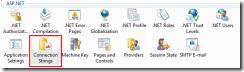
image001

sábado, 4 de febrero de 2012

Farm Solution Deployment Lock and Removal

Farm Solution Deployment Lock may occur when a solution (.wsp) deployment fails unexpectedly.

Solution Deployment in SharePoint happens through the timer jobs. When you deploy a solution along with the deployment job a timer job named "Solution Deployment Job Lock" is created which store the deployment job's id and the lifetime of the job is till the deployment job is completed. With this SharePoint ensures that no two deployments conflict with each other.

From the above we can conclude that in SharePoint one deployment job happens at a given time courtesy the solution deployment lock. Hence using this feature SharePoint ensures that no more than one deployment or retraction can happen at a given time.

To recover from this lock you need ton use the following PowerShell command which releases the solution deployment lock.

http://technet.microsoft.com/en-us/library/ff607750.aspx


Fuente:

http://www.dhirendrayadav.com/2012/02/farm-solution-deployment-lock-and.html