Mostrando entradas con la etiqueta People Picker. Mostrar todas las entradas

sábado, 21 de febrero de 2015

Tips de Troubleshooting para People Picker de Sharepoint

Voy a mostrar algunos tips útiles para verificar el funcionamiento correcto del People Picker de Sharepoint.

Entorno (montado sobre Azure):

  • AD: Windows Server 2012
  • 1 Granja (1 WFE, 1 App Server, 1 SQL Server)
  • Sharepoint 2013 SP 1, CU de febrero 2015

El people picker de Sharepoint es el responsible de consultar el AD en búsqueda de usuarios (accounts) y grupos, se usa para dar permisos a los sitios de Sharepoint.

imageimage

En este link podrás ver todas las configuraciones posibles del People Picker.

En este link y en este podrás ver la secuencia que se realizar cuando haces un “check name” en el people picker. En 50 pasos ves cómo funciona el people picker.

Algunos pasos resumidos:

  • Cuando haces una consulta en el people picker, el WFE consulta via una DNS Query al Global Catalog Service (se llama “LDAP Global Catalog Search Request”)
  • En esta query, se pregunta por usuarios y grupos que tengan un string de búsqueda (wildcard search).
  • Cuando se busca en el AD, se busca por los siguientes atributos

# User objects: 'name', 'displayName', 'cn', 'sn', 'SamAccountName', 'mail', 'proxyAddresses'

# Group objects: 'name', 'displayName', 'cn', or 'SamAccountName' attributes.

Ahora mostremos algunos tips útiles para hacer throu

1-Evaluar la conectividad desde el WFE hacia el Global catalog.

Supongamos que estamos en el dominio “contoso.com”.

image

Supongamos que estamos buscando todas las cuentas que tengan “sp” en el display name o en el atributo “SamAccountName”. Sharepoint cómo les comenté buscará en varios atributos del container de usuarios y grupos de AD (user Objects y groups Objects)

Supongamos que también buscamos por un grupo específico (Ej: que tengan en el display name “Domain”). En amarillo las líneas más importantes.

El siguiente query (descargar) nos permite evaluar la conexión contra nuestro el AD, buscando un usuario y un grupo (usando wildcards). La funcionalidad es parecida a cómo busca Sharepoint.


function SearchUsers($cn) {   
   $strFilter = "(&(objectClass=User)(cn=$cn))" 
   $objDomain =New-Object System.DirectoryServices.DirectoryEntry("LDAP://CONTOSO")
   $ds = New-Object System.DirectoryServices.DirectorySearcher 
   $ds.SearchRoot = $objDomain 
   $ds.PageSize = 1000 
   $ds.PropertiesToLoad.Add("displayName") 
   $ds.PropertiesToLoad.Add("name") 
   $ds.PropertiesToLoad.Add("cn") 
   $ds.PropertiesToLoad.Add("sn") 
   $ds.PropertiesToLoad.Add("SamAccountName") 
   $ds.PropertiesToLoad.Add("mail") 
   $ds.PropertiesToLoad.Add("proxyAddresses") 
   $ds.Filter = $strFilter 
   $ds.SearchScope = "Subtree"   
   Write-Host " >> Buscando usuarios: " $cn 
   $colResults = $ds.Findall()
   foreach ($usrTmp in $colResults)
    {
      Write-Host $usrTmp.Properties["name"]
    }
} 

function SearchGroup($cn) {   
   $strFilter = "(&(objectClass=group)(cn=$cn))" 
   $objDomain =New-Object System.DirectoryServices.DirectoryEntry("LDAP://CONTOSO")
   $ds = New-Object System.DirectoryServices.DirectorySearcher 
   $ds.SearchRoot = $objDomain 
   $ds.PageSize = 1000 
   $ds.PropertiesToLoad.Add("displayName") 
   $ds.PropertiesToLoad.Add("name") 
   $ds.PropertiesToLoad.Add("cn") 
   $ds.PropertiesToLoad.Add("sn") 
   $ds.PropertiesToLoad.Add("SamAccountName") 
   $ds.Filter = $strFilter 
   $ds.SearchScope = "Subtree"    
   Write-Host " >> Buscando grupos: " $cn 
   $colResults = $ds.Findall()
   foreach ($usrTmp in $colResults)
    {
      Write-Host $usrTmp.Properties["name"]
    }
}

$startDTM = (Get-Date)
SearchUsers("*sp*") 
$endDTM = (Get-Date)
"La consulta tardo: $(($endDTM-$startDTM).totalseconds) segundos"

$startDTM = (Get-Date)
 SearchGroup("*domain*") 
$endDTM = (Get-Date)
"La consulta tardo: $(($endDTM-$startDTM).totalseconds) segundos"
 

Cuando lo ejecuto me retorna lo siguiente.

image

image

Es cómo si hubiera hecho esto.

image

image

Este script nos permite evaluar la performance de búsqueda de perfiles y grupos contra nuestro Global Catalog. Cómo pueden ver los tiempos son muy buenos.

2-Evaluar la conectividad mediante Message Analyzer

Ejecuto lo siguiente en la línea de comandos (run as a administrator)

netsh trace start persistent=yes capture=yes tracefile=C:\nettrace-sharepoint.etl

image

Después realizo algunas querys desde el People Picker, ej: sp_

image

Después detengo el trace.

netsh trace stop

image

Abro el Message Analyzer cómo administrador (run as a administrator)

Selecciono New Session / Files

image

Agrego el archivo del trace

image

En la sección de filtros agrego lo siguiente: contains "displayName"

image

En los mensajes veo que las query al AD, en el sumary dice:

Search Operation Search For RootDSE

Cuando entro a un mensaje, por ejemplo 1003

image

Hago click en el atributo LDAP.

En filter dice lo siguiente

(((objectCategory == person) && ((SubstringFilter{Type=anr,SubStrings=[Sp_]}) || (SubstringFilter{Type=SamAccountName,SubStrings=[Sp_]}))) || ((objectCategory == group) && (MatchingRuleAssertion{MatchingRule=1.2.840.113556.1.4.803 (LDAP_MATCHING_RULE_BIT_AND),Type=groupType,MatchValue=2147483648,DnAttributes=False}) && ((SubstringFilter{Type=anr,SubStrings=[Sp_]}) || (SubstringFilter{Type=SamAccountName,SubStrings=[Sp_]}))))

Pero si entro en más detalle, en la parte de Filter, veo que tiene dos contenidos (objectCategory==person y objectCategory==group). Es decir en la misma query, consulta por usuarios y grupos que coincidan con “sp_”

image

Los atributos que cargo en la query son

image

Si filtro solamente el mensaje 1003 vero que el tiempo que tardo en hacer la consulta fue de 0.0024204 ms

image

Y necesitó 4 paquetes para obtener los resultados

image

El AD (10.0.0.4) le retorno 3 paquetes, si ven en el summary, ven que dice LDAP Message, Search Result Entry, MessageID: 43

image

Si ves el field data, podes ver que aparece (SP_farm y SP_setup) lo mismo que buscaste por Sharepoint

image

image

Algunos links útiles:

http://thesharepointfarm.com/2014/01/people-picker-troubleshooting-tips/

sábado, 13 de septiembre de 2014

Cómo usar el plugin SPWidgets para buscar usuarios con Jquery/SPServices (javascript people picker)

En nuestra página agregamos las referencias a los siguientes archivos:

jquery.js (http://jquery.com/download/)

jquery.SPServices.min.js (http://spservices.codeplex.com/)

jqueryui.min.js (http://jqueryui.com/download/)

/_layouts/1033/init.js

/_layouts/1033/sp.core.js

/_layouts/1033/sp.runtime.js

/_layouts/1033/sp.js

jquery.SPWidgets.min.js  (http://purtuga.github.io/SPWidgets/)

Después agregar las referencias a los archivos css de jqueryUI

En nuestra página agregamos un textbox con un icono de usuario, que al hacer click se muestra el siguiente popup

image

image

Para hacer esto, debermos tener el siguiente div.

<div id="dialog-message" title="Buscar usuario" style="display:none">   
        <b>Busque por mail,por sigla o por nombre. Es necesario al menos 3 caracteres para iniciar la búsqueda.</b></br></br></br>

        <input name="users" value="" style="width:350px!important" >   
</div>

Dentro del document.ready de jquery ejecutamos el siguiente código de javascript, que permite agregar toda la funcionalidad de búsqueda de usuarios estilo people picker de Sharepoint.

$("input[name='users']").pickSPUser({
        allowMultiples: false,
        meKeyword: "[me]",
        meKeywordLabel: "Current User",
        onPickUser: function(person){           
            var mail = GetMailfromSigla(person.accountName );
            if (mail != "")
                $('#' + inputSearchSelect).val(mail);
           
            $( "#dialog-message" ).dialog('close');
        }                     
    });       

En el caso que quieramos limpiar la búsqueda, podemos ejecutar el siguiente script.

$("input[name='users']").pickSPUser("method", "clear");

image

domingo, 8 de junio de 2014

Sharepoint & Active Directory–Tips

Voy a presentar un par de tips relacionados a la integración de Active Directory y Sharepoint.

Tip 1: Entiende el proceso de logueo de los servidores de Sharepoint contra el AD (DC Locator Process): http://social.technet.microsoft.com/wiki/contents/articles/24457.how-domain-controllers-are-located-in-windows.aspx

http://blogs.technet.com/b/arnaud_jumelet/archive/2010/07/05/domain-controller-locator-an-overview.aspx

Tip 2: Ten los servidores en el mismo sitio de AD de Sharepoint, con dos Domain Controler minimamente por cada sitio de AD (ten los DC del sitio con diferente prioridad y peso, para tener un mejor throubleshooting en un futuro, lo cual permitirá siempre loguearse al mismo DC y hacer un mejor throubleshooting). También es recomendable que sean Global Catalog los Domain Controler.

image

Tip 3: entiende el proceso de autenticación del navegador con Sharepoint (y la integración con el AD): http://blogs.msdn.com/b/cgideon/archive/2006/05/18/601230.aspx

http://technet.microsoft.com/en-us/library/cc780332(v=ws.10).aspx

Tip 4: cuando es posible, utiliza kerberos, ya que mejora la seguridad y performance de la autenticación contra el AD.

Tip 5: revisa tu configuración de AD, cuando tengas los siguientes problemas:

  • DNS name lookups failures
  • Access Denied/Authentication Failures
  • Slow logon/Authentication Delays
  • Slow people picker search
  • Lookups de users

Links útiles:

http://social.technet.microsoft.com/wiki/contents/articles/10130.root-causes-for-slow-boots-and-logons-sbsl.aspx

http://blogs.msdn.com/b/spatdsg/archive/2006/01/05/507299.aspx

http://social.technet.microsoft.com/wiki/contents/articles/9759.configuring-maxconcurrentapi-for-ntlm-pass-through-authentication.aspx

http://blogs.technet.com/b/christwe/archive/2012/10/29/so-i-have-increased-maxconcurrentapi-for-my-sharepoint-servers-now-what.aspx

Tip 6: Entiende como funciona el people picker:

http://www.marc-lognoul.me/itblog-en/sharepoint-people-picker-and-active-directory-part-1/

http://www.marc-lognoul.me/itblog-en/sharepoint-people-picker-and-active-directory-part-2/

http://blogs.msdn.com/b/rajank/archive/2009/09/01/all-you-want-to-know-about-people-picker-in-sharepoint-functionality-configuration-troubleshooting-part-1.aspx

http://blogs.msdn.com/b/rajank/archive/2009/09/20/all-you-want-to-know-about-people-picker-in-sharepoint-functionality-configuration-troubleshooting-part-2.aspx

lunes, 25 de febrero de 2013

Links útiles #59–Sharepoint 2010

1-Services App Starter Kit para Visual Studio 2010 y Sharepoint 2010 (crear Sharepoint custom services)

http://visualstudiogallery.msdn.microsoft.com/a8539635-2d9a-468e-bddf-341332061ec7

2-Metadata sobre una carpeta de Sharepoint

http://geeks.ms/blogs/santypr/archive/2012/10/16/sharepoint-2010-a-241-adir-metadatos-a-las-carpetas-de-una-biblioteca-de-documentos.aspx

3-Remover usuarios huérfanos (no están más en el Active Directory) de Sharepoint 2010

http://weblogs.asp.net/bsimser/archive/2013/02/12/powershell-tools-removing-orphaned-users-from-sharepoint.aspx

4-MySite en detalles

http://blogbaris.blogspot.com.ar/2011/03/sharepoint-2010-mysite-in-detail.html

http://blogbaris.blogspot.com.ar/2010/09/how-to-setup-mysite-in-sharepoint-2010.html

5-Load Balanced Central Administration Sharepoint 2010

http://walkthroughsharepoint2010.blogspot.com.ar/2013/02/central-admin-load-balance-procedure.html

6-Snapshots en Sharepoint 2010

http://blogs.msdn.com/b/mossbiz/archive/2013/01/14/sharepoint-vs-snapshots.aspx

http://blogs.msdn.com/b/mossbiz/archive/2013/02/22/sharepoint-vs-snapshots-part-2.aspx

7-SPServices y CRUD operaciones

http://meandmysharepoint.blogspot.com.ar/2013/02/crud-operations-using-spservices.html

8-Best practices de VMware para Sharepoint 2010

http://www.vmware.com/solutions/business-critical-apps/sharepoint-virtualization/index.html

http://www.vmware.com/files/pdf/solutions/SharePoint_2010-Best-Practices-Guide.pdf

9-Deploy web part en Sharepoint 2010

http://amalhashim.wordpress.com/2013/02/14/sharepoint-deploy-webpart-page-using-module/

10-People Picker en Silverlight

http://blogs.technet.com/b/speschka/archive/2011/08/09/writing-a-sharepoint-2010-people-picker-control-for-silverlight.aspx

lunes, 18 de febrero de 2013

Links útiles #20 Sharepoint 2013

1-Caracteristicas y capacidades de Sharepoint 2013 para sitios de internet (features and capabilities )

http://blogs.technet.com/b/mspfe/archive/2013/01/29/public-facing-internet-sites-based-on-sharepoint-server-2013.aspx

2-People Picker para Apps en Sharepoint 2013

http://msdn.microsoft.com/en-us/library/jj713593(v=office.15).aspx

3-Instalar Sharepoint 2013 sobre Azure

http://labratcentral.wordpress.com/2013/01/25/install-sharepoint-2013-on-azurevm-how-to/

4-Mover Search Index Sharepoint 2013

http://gallery.technet.microsoft.com/scriptcenter/Move-SharePoint-2013-242869e2

5-MVC y Apps en Sharepoint 2013

http://spblogedin.blogspot.com.ar/2013/02/las-apps-de-sharepoint-2013-iv-una-app.html#.URrARKWqllg

http://www.ilovesharepoint.com/2012/07/building-aspnet-mvc-based-sharepoint.html

6-SSL para Central Administration en Sharepoint 2013

http://www.harbar.net/archive/2013/02/13/Using-SSL-for-Central-Administration-with-SharePoint-2013.aspx

7-WAN y Sharepoint 2013

http://technet.microsoft.com/en-us/library/hh206322.aspx

8-Best Bet o Promoted results search en Sharepoint 2013

http://nishantrana.wordpress.com/2013/02/06/best-bet-or-promoted-results-in-sharepoint-2013/

9-Refinement Panel en Sharepoint 2013

http://nishantrana.wordpress.com/2013/02/06/adding-refiner-count-in-refinement-web-part-in-sharepoint-2013/

10-App para Sharepoint hosteada en Azure

http://blogs.msdn.com/b/steve_fox/archive/2013/02/18/building-your-first-provider-hosted-app-for-sharepoint-using-windows-azure-part-1.aspx

jueves, 17 de enero de 2013

Tips Info #92 Sharepoint 2010

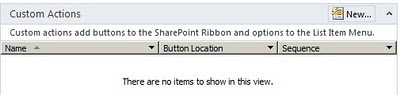
1-Agregar Javascript en botones de la Ribbon

Custom action - new form ribbon

En la acción, elegir “Navigate to URL”. En ese campo puede agregar una url o código javascript. Ya qué el código que ingrese, se agrega en el atributo href del anchor.

Ej: javascript:var d=document.location.href.replace(‘&IsDlg=1′,”);window.open(d);

Este javascript, lo que hará es mostrar la página actual como PopUp.

Select third and paste the javascript

2-Evitar los 255 caracteres de límite en los campos “multiple line text”

Setear el atributo Allow unlimited length in document libraries con el valor Yes

3-Remover un usuario para que no aparezca en el People Picker

Se debe eliminar desde:

  • La User Information List de la site collection (_catalogs/users/simple.aspx)
  • De la base de datos de Profile (User Profile Service Application)
  • Active Directory

4-Configurando el search settings del site collection

image

Propiedad SRCH_SITE_DROPDOWN_MODE, esta propiedad permite controlar las opciones del combo de search:

Do Not Show Scopes Dropdown, and default to contextual scope – HideScopeDD_DefaultContextual
Do Not Show Scopes Dropdown, and default to target results page – HideScopeDD
Show scopes Dropdown – ShowDD
Show, and default to ‘s’ URL parameter – ShowDD_DefaultURL
Show and default to contextual scope – ShowDD_DefaultContextual
Show, do not include contextual scopes – ShowDD_NoContextual
Show, do not include contextual scopes, and default to ‘s’ URL parameter – ShowDD_NoContextual_DefaultURL

Propiedad SRCH_ENH_FTR_URL, esta propiedad permite setear la URL o path relativo al Search Center.

Hay algunas combinaciones con las dos propiedades:

Site Collection Search Dropdown Mode Property Value Search Results URL
Do Not Show Scopes Dropdown, and default to contextual scope HideScopeDD_DefaultContextual Y
Do Not Show Scopes Dropdown, and default to target results page HideScopeDD N
Show scopes Dropdown ShowDD Y
Show, and default to ‘s’ URL parameter ShowDD_DefaultURL Y
Show and default to contextual scope ShowDD_DefaultContextual Y
Show, do not include contextual scopes ShowDD_NoContextual N
Show, do not include contextual scopes, and default to ‘s’ URL parameter ShowDD_NoContextual_DefaultURL N

$web = Get-SPWeb http://intranet.sharepoint.com
$web.AllProperties["SRCH_ENH_FTR_URL"] = “/search/”
$web.AllProperties["SRCH_SITE_DROPDOWN_MODE"] = HideScopeDD_Defaultcontextual
$web.AllProperties["SRCH_TRAGET_RESULTS_PAGE"] =”/_layouts/OSSSearchResults.aspx”
$web.update()

5-Agregar sugerencias en el search de Sharepoint 2010

image

Para que una palabra se agregue como sugerencia, se debe clickear 6 veces en un año mínimamente. Se puede pasar esta limitación mediante powershell.

$searchapp = Get-SPEnterpriseSearchServiceApplication -Identity "<SearchServiceApplicationName>"
New-SPEnterpriseSearchLanguageResourcePhrase -SearchApplication $searchapp -Language En-Us -Type QuerySuggestionAlwaysSuggest -Name "nueva sugerencia"

$timer=Get-SPTimerJob|? {$_.Name -eq "Prepare Query Suggestions"}
$timer.RunNow()
   
Get-SPEnterpriseSearchQuerySuggestionCandidates -SearchApp $ssa

Remove-SPEnterpriseSearchLanguageResourcePhrase -SearchApplication $ssa -Language En-Us -Type QuerySuggestionAlwaysSuggest -Identity "nueva sugerencia"

Este scrip agregará el texto “nueva sugerencia” como sugerencia para un site seteado con el idioma En-Us. También se dispara el timer “Query Suggestions” para que liste en todos los servicios de search.

Y la última línea remueve la sugerencia previamente creada.

Más información: http://technet.microsoft.com/en-us/library/hh148698(v=office.14).aspx

viernes, 14 de septiembre de 2012

Tips/Info #68 Sharepoint 2010

1-Obtener el tamaño de los sites collections y exportar los resultados a un csv

Get-SPSite -Limit ALL | select title, url, @{label="Size in GB";Expression={$_.usage.storage/1GB}} | Sort-Object -Descending -Property "Size in GB" | Export-CSV C:\sizeSitesCollection.csv

2-Deployar infopath form al Central Administration

Central Admin > General Application Settings > Manage form templates

Test-SPInfoPathFormTemplate -path "c:\solution\FormTest.xsn"
Install-SPInfoPathFormTemplate -path “c:\solution\FormTest.xsn"
Enable-SPInfoPathFormTemplate -identity "FormTest" -site http://siteCollectionURL

Más info: http://technet.microsoft.com/en-us/library/ff607608.aspx

3-El people picker no muestra usuarios del AD

Verifica que las cuentas que configuraste Sharepoint sean usuarios del AD, no cuentas locales.

4-Restringir el people picker a obtener usuarios de sites collections solamente

stsadm -o setproperty –url <web-app-URL> –pn peoplepicker-onlysearchwithinsitecollection –pv yes

Para verificar si esta habilitado o no:

stsadm -o getproperty –url <web-app-URL> –pn peoplepicker-onlysearchwithinsitecollection 

http://technet.microsoft.com/en-us/library/cc261988(v=office.12).aspx

5-Detectar la versión de Sharepoint

Ingresar a regedit: HKEY_LOCAL_MACHINE\SOFTWARE\Microsoft\Shared Tools\Web Server Extensions\14.0\WSS\InstalledProducts

Si se desea usar PowerShell, se puede usar el siguiente comando: Get-SPFarm | Select Products

jueves, 16 de agosto de 2012

Links útiles #47 Sharepoint 2010

1-Microsoft® SQL Server® 2008 R2 Reporting Services Add-in for Microsoft SharePoint® Technologies 2010

http://www.microsoft.com/en-us/download/details.aspx?id=622

2-Limitaciones de sandboxed solutions

http://salaudeen.blogspot.ca/2012/03/50-limitations-of-sharepoint-sandboxed.html?m=1

3-Crear custom field en Sharepoint 2010

http://christopherclementen.wordpress.com/2012/07/23/create-custom-field-type-with-user-control/

4-Tips de Búsqueda en Sharepoint 2010

http://cloud2.snappages.com/b8898dc2c08e137d03449de65b9e82e108c15658/Essential_SharePoint_Search_Hints_for_SharePoint_2010_and_Beyond.pdf

5-Custom action de Word Automation para convertir documentos en Sharepoint Designer

http://blog.petergerritsen.nl/2010/01/13/codeplex-project-for-word-automation-services/

6-Llamar web services desde infopath

http://wmostafaw.wordpress.com/2012/08/07/calling-web-service-from-infopath-2010-with-parameters/

7-Consumir un WCF services desde una sandboxed solutions

http://msmvps.com/blogs/sundar_narasiman/archive/2012/08/12/consuming-a-wcf-service-from-sharepoint-2010-sandbox-solutions.aspx

8-Agregar un forest de Active Directory al people picker de Sharepoint 2010

http://qazimobeen.wordpress.com/2012/08/06/sharepoint-people-picker-configuration-for-multiple-ad-forests/

9-Ver historial de Timer Jobs mediante PowerShell

http://www.glynblogs.com/2011/12/viewing-timer-job-history-for-a-specific-date-and-time-period.html

10- Highlight de una propieda custom en los resultados de búsqueda

http://edanan.wordpress.com/2012/08/09/highlight-custom-property-in-sharepoint-search-result/

miércoles, 20 de junio de 2012

Links útiles #36 Sharepoint 2010

1-Listas externas con Sharepoint Workspaces

http://www.c-sharpcorner.com/UploadFile/anavijai/external-lists-in-sharepoint-workspace/

2-Publicar aplicaciones de servicios a otras granjas (Managed Metadata Service)

http://www.c-sharpcorner.com/UploadFile/anavijai/how-to-publish-a-service-application-in-sharepoint-2010/

3-Crear un custom document ID provider

http://www.c-sharpcorner.com/UploadFile/anavijai/how-to-create-custom-document-id-provider-in-sharepoint-2010/

http://www.c-sharpcorner.com/UploadFile/anavijai/custom-document-id-provider-web-part-for-sharepoint-2010/

4-Mostrando gráficos dentro de una vista de lista

http://blog.johnsworkshop.net/displaying-data-using-bar-graphs-inside-your-sharepoint-list-views/

http://blogs.msdn.com/b/sharepointdesigner/archive/2008/06/27/css-style-bar-graphs-using-data-views.aspx

5-Business Data Connectivity Model: agregando un filtro a uno existente

http://www.c-sharpcorner.com/UploadFile/anavijai/how-to-add-a-comparison-filter-descriptor-to-a-finder-method-in-business-data-connectivity-model/

6-Instalando Reporting Services en una granja existente de Sharepoint 2010

http://sharepointgeorge.com/2012/installing-configuring-reporting-services-sharepoint-2010-existing-farm/

7-Hold and Discovery

http://www.c-sharpcorner.com/uploadfile/anavijai/holds-and-hold-reports-in-sharepoint-2010/

http://mysharepointsolution.wordpress.com/2012/06/13/sharepoint-2010-hold-and-ediscovery-feature-part-1/

http://mysharepointsolution.wordpress.com/2012/06/13/sharepoint-2010-hold-and-ediscovery-feature-part-2/

http://mysharepointsolution.wordpress.com/2012/06/13/sharepoint-2010-hold-and-ediscovery-feature-part-3/

8-People Picker en Infopath

http://blogs.solidq.com/sharepoint/Post.aspx?ID=174&title=Person%2fGroup+Picker+en+InfoPath+2010+%E2%80%93+Parte+1

9-ISA Server Sharepoint 2010

http://sharing-the-experience.blogspot.com.ar/2012/02/isa-how-to-redirect-http-to-https-how.html

10-Configurar el search de Sharepoint 2010

http://sharepointjourney.wordpress.com/2012/06/13/configure-search-in-sharepoint-2010/